DoorMonitoring cylinder - LSM 3.6 SP1 Business + Prof.
In the LSM or in Smart.Surveil, you can monitor your DoorMonitoring cylinders. To do this, however, you first have to configure the DoorMonitoring cylinders in LSM:
- LSM open.
- Matrix screen open
- Double-click on the DM-cylinder to open the settings.
- Change to tab Configuration/Data.
- Click on the button Monitoring configuration.
- The window Door Monitoring Configuration opens.
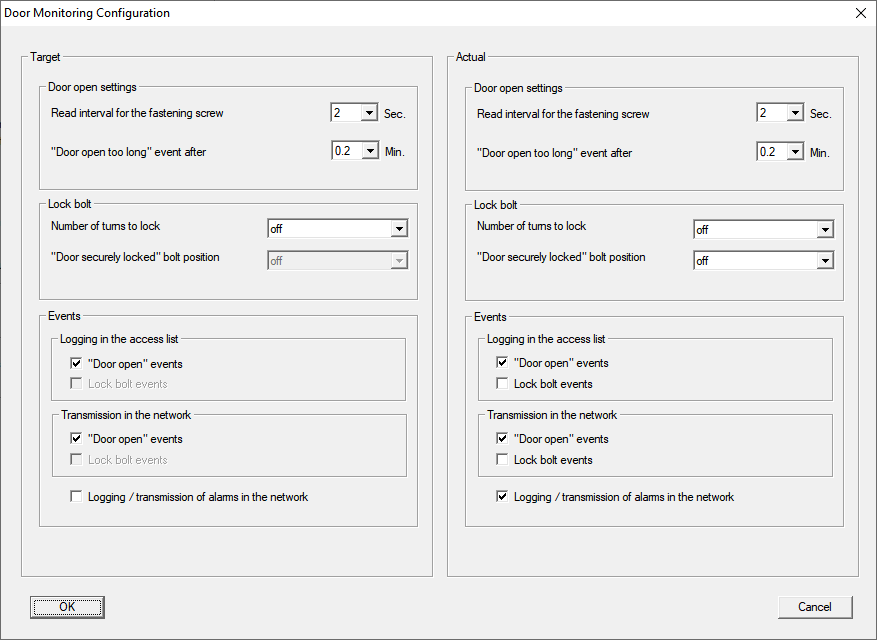
- Activate in the area Target-Events in the areas Logging in the access list and Transmission in the network the DoorMonitoring events that you would like to monitor (e.g.
 "Door open" events).
 - If necessary, make further DoorMonitoring settings, e.g. in the area Door open settings.
- Click on the OK button.
- The window Door Monitoring Configuration closes.
- Click on the Apply button.
- Programme the cylinder
- DoorMonitoring events are stored in the LSM database and can be evaluated by LSM and SmartSurveil.