Manage warnings - LSM 3.6 SP1 Business + Prof.
Available in LSM Business with enabled online module only.
The warning function provides help with working with LSM Business on a daily basis. You can configure the system to notify you of certain situations (e.g. return of transponder pending) or other events (locking device battery warning). Warnings are displayed in the warning monitor when LSM is launched. The warning monitor opens every 15 minutes.
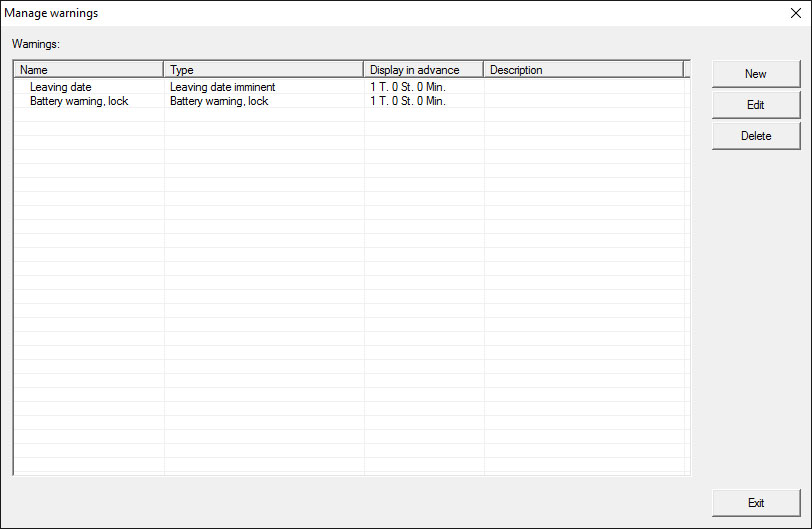
- Table
- Overview of the added warnings.
- New
- Create a new warning.
- Edit
- You can edit the settings after selecting the warning that you require.
- Delete
- You can delete the warning after selecting the one that you require.
You can use the "New" button to add a new warning:
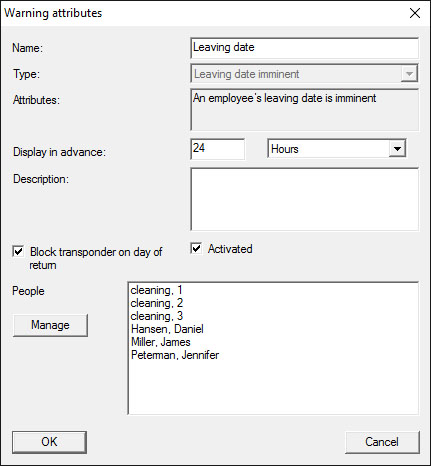
- Name
- Name of the warning.
- Type
- Type of warning, such as locking device battery warning.
- Properties
- Are established based on the warning type.
- Advanced notice
- Time frame between the warning and the cause of the warning coming into effect.
- Description
- Blank field to describe the warning.
- Block transponder on day of return
- Authorisations for locking devices are withdrawn from the transponders in the locking plan on the day of return -> Programming requirement.
- Enabled
- The warning is used if enabled.
- Manage
- Selects the objects to be monitored.
- Table
- Displays the selected components.
You can select the following warnings:
- Leaving date reached
- Battery warning for locking device
- Battery warning for transponders
- Export to handheld PDA
- Scheduled battery replacement
- Return of transponder pending
- Transponder expiry date