Configure ADS server - LSM 3.6 SP1 Business + Prof.
Configure the ADS server with the help of the Advantage Configuration Utility:
- Launch the Advantage Configuration Utility, e.g. at Start/Programme/Advantage Database Server/Advantage Configuration Utility. (The Configuration Utility may have already been launched)
- Select the "Configuration Utility" tab.
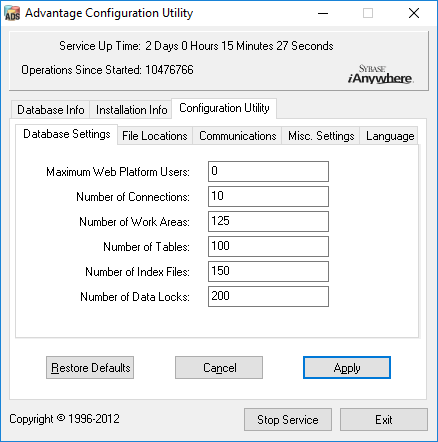
- Change the following properties in the "Database Settings" tab and press the "Apply" button to save:
- Change the following properties in the "File Locations" tab and press the "Apply" button to save:
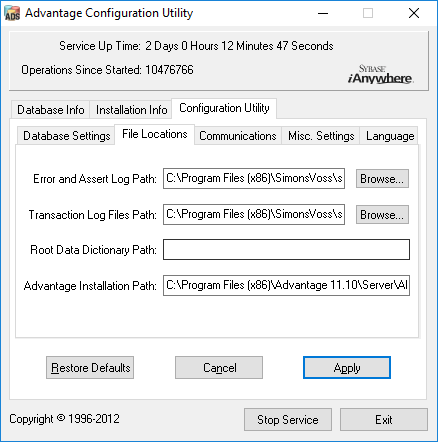
- Note that the drive path may differ from the one on the server (here C:).
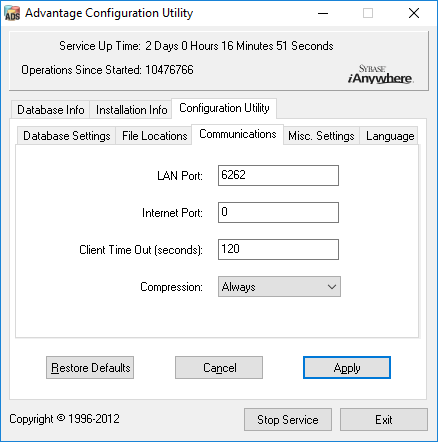
- Change the following properties in the "Communications" tab and press the "Apply" button to save:
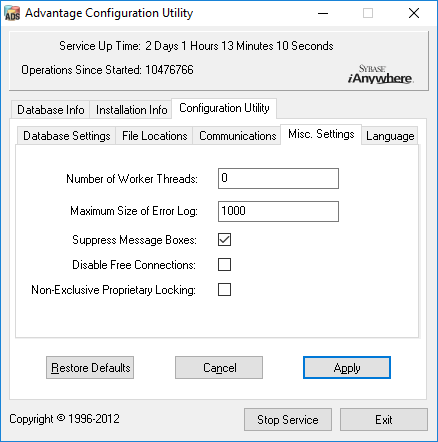
- Change the following properties in the "Misc. Settings" tab and press the "Apply" button to save:
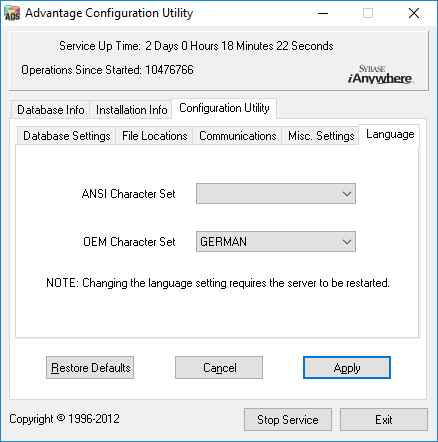
- Change the following properties in the "Language" tab and press the "Apply" button to save: