SmartRelay (G1): SREL, SREL.ADV, SREL.W - LSM 3.6 SP1 Business + Prof.
This tab (Configuration/Data) is divided into two sides:
- The left side shows the target status of the locking device (Actual) – i.e. the desired status configured in the LSM software.
- The right side shows the locking device's current status (Target) – i.e. the status which was last programmed.
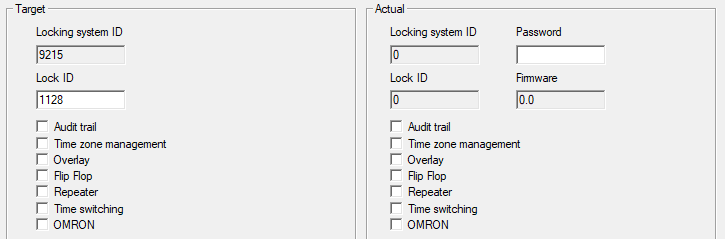
The following features can be enabled depending on the locking device type:
| Only possible for locking devices with .ZK. The last 1,024 transponder activations are logged with the date and time. |
| A time zone plan can be uploaded and the transponders are approved or blocked according to their time zone group. |
| Replacement transponders can overwrite their corresponding original transponders. The original transponder is blocked once the replacement transponder is used for the first time. |
| Pulse mode (default setting) is switched off and the pulse duration no longer plays a role. When flip flop mode is activated, SmartRelay changes its status from on to off or vice versa each time it is activated using a transponder. This mode is ideal for switching lights, machines and other systems on and off. Where applicable, you should ensure that mains adapters and electric strikes are suitable for continuous current operation in such an installation. |
| The SmartRelay receives a transponder signal, which it amplifies and forwards. This function allows SmartRelay to be used to bridge longer radio transmission paths. The distance to the next SmartRelay can be up to 2 m. |
| Available for:
A time zone plan needs to be uploaded when the time switch-over is activated. This allows SmartRelay to remain unlocked during the indicated times (in Group 5). During the day, the door can be used freely while only a transponder will open the door at night. You should ensure that mains adapters and electric strikes are suitable for continuous current operation in such an installation. |
| For SREL.ADV only Many access control and time-and-attendance systems feature serial interfaces to connect card readers. A SmartRelay can also be connected via these interfaces, thus also allowing you to use SimonsVoss transponders in third-party systems. Select this option on both the SmartRelay and the cylinder if you wish the SmartRelay to transmit transponder data to a third-party system and a remote opening command to be sent from SmartRelay to a cylinder after clearance by the third-party system. Set the type of external system under Interface. Click on the Extended configuration button to do so. |
 Audit trail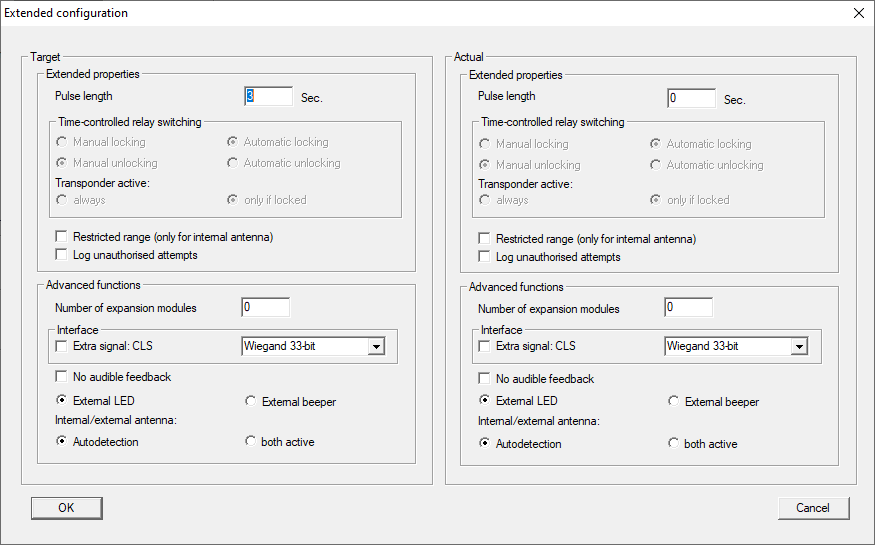
Some settings can be specified using the Extended configuration button:
Pulse length | This is where you indicate the number of seconds for the duration of switch pulse. The value can be set at 0.1 to 25.5 seconds. If you enter 3 seconds, for example, an electric strike is released for 3 seconds before it locks again. |
| If you select this option, the reader range from the transponder to the SmartRelay is reduced from 1.5 m to about 0.4 m. This option can be used when several SmartRelays are in close proximity to one another and individual transponders are authorised for use on several SmartRelays, for example. |
| For SREL.ZK and SREL.ADV only: Normally, only authorised transponder operations are logged. You need to select this option if you also wish to record attempts to open the door with non-authorised transponders. |
Number of extension modules | This where you indicate the number of external modules connected to the SmartRelay. These modules are connected to the terminals RS-485 C OM, RS-485 A and RS-485 B. |
Interface | For SREL.ADV only: You can enter the type of card reader here which the SmartRelay is to simulate for operation as a serial interface. The following options are available:
|
| For SREL.ADV only: You should check this field if you do not want audible programming confirmation signals to be emitted from a connected buzzer or beeper while you are programming SmartRelay. |
| For SREL.ADV only: This indicates which external component group is connected. In flip flop mode, SmartRelay emits a permanent signal when switched on if there is an external LED; in the case of a beeper, an audible signal is only emitted when there is a change of status. |
| For SREL.ADV only
|
 External LED