Start Server Management automatically with admin rights - LSM 3.6 SP1 Business + Prof.
LSM.AX2Go Server Management should always be started with administrator rights so that it is able to end and start services.
The link can be set so that LSM.AX2Go Server Management starts automatically with admin rights.
- LSM.AX2Go Server Management installed (see Server administration).
- Windows admin rights available.
- In the start menu, search for the option
LSM.AX2GoMgm. 
- Right-click on this option to open the context menu and select the option.
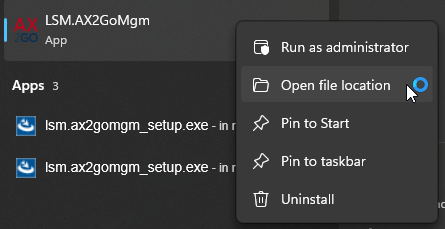
- Windows Explorer opens and displays the
LSM.AX2GoMgmlink. - Right-click on the link to open the context menu and select the option.
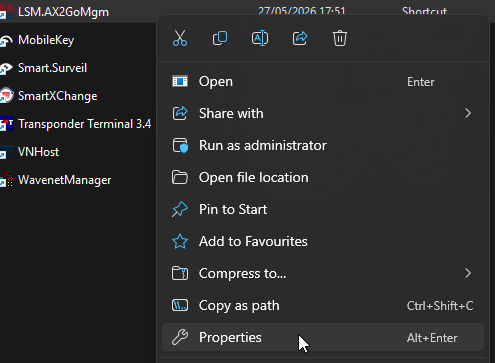
- A window showing the properties of the LSM.AX2GoMgm link will open.
- Click the Advanced... button.
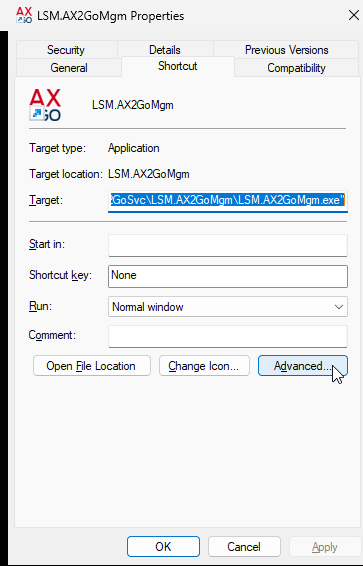
- The Advanced Properties window will open.
- Select the
 Run as administrator checkbox.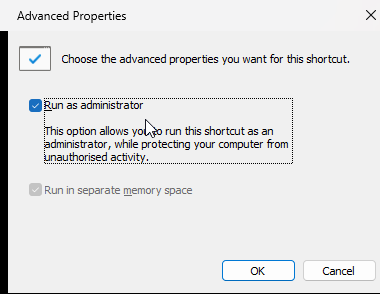
- Click on the OK button.
- Window Advanced Properties closes.
- Click on the OK button.
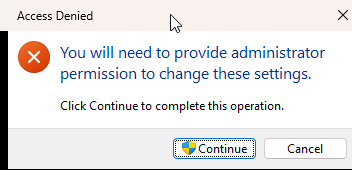
- If an admin rights window opens, log in with an administrator account.
- The window with the properties of the LSM.AX2Go link will close.
- If you launch LSM.AX2Go Server Management from the start menu in future, it will be launched automatically with admin rights.