Configure LSM Business - LSM 3.6 SP1 Business + Prof.
LSM Business needs to be configured once. In this step, we copy an empty locking plan onto the server and configure LSM Business, so that it can access this locking plan.
- Extract the locking plan, which is stored in the LSM Business installation directory (e.g. C:\Programs (x86)\SimonsVoss\LockSysMgr_3_6\db), and transfer it to the "sv_db" server directory.
- Launch LSM Business (e.g. using Start/Programs/SimonsVoss/LSM Business).
- Select "Setup".
- If it is being run for the first time, a window will open, where the database path is to be set.
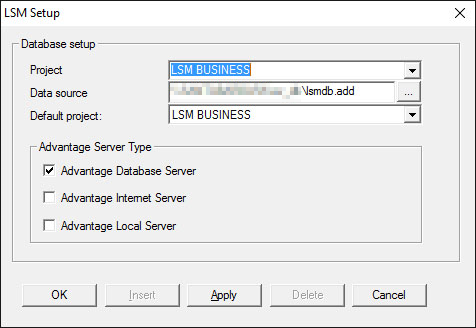
- Enter a project name.
- Use the "..." button to select the path to the server and link directly to the lsmdb.add file. In the case of hidden releases, the path to lsmdb.add must be entered directly with the $ character, e.g.: \\<SERVER>\sv_db$\lsmdb.add
- You cannot select a local directory in LSM Business.
- Apply the settings.