Handling defective locking devices - AXM Classic
Defective locking devices cause problems. Reasons for failure may include:
- Software defects
- Hardware defects
As a basic rule, all actions can be performed using the wizard section on the right-hand side:
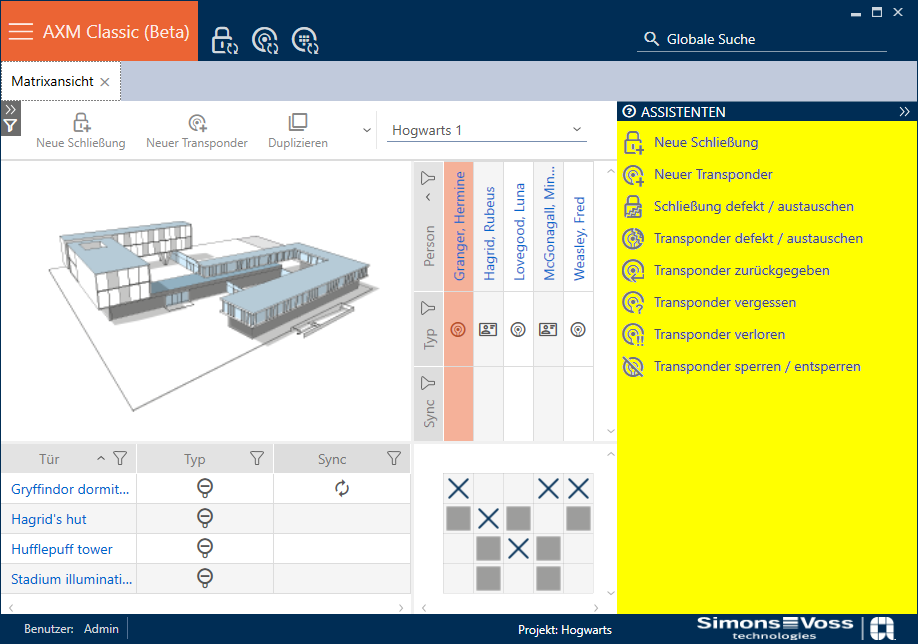
AXM Classic provides you with a wizard to repair defective locking devices.
The following overview will help you decide on the right course of action (information about the relationship between the locking device and the locking device ID stored internally in the project (= lock ID or LID): Identification media, locking devices and the locking plan
Locking device is required again immediately:
Suitable for:
Repair | Resetting and replacing | Delete and replace |
|---|---|---|
Locking devices with an undefined software status |
| Locking devices permanently damaged (e.g. thumb-turn broken off) which require replacement. |
Example situation:
Repair | Resetting and replacing | Delete and replace |
|---|---|---|
Bed pressed against thumb-turn, thumb-turn bent | Bed pushed against thumb-turn, thumb-turn broken off |
Procedure:
Repair | Resetting and replacing | Delete and replace |
|---|---|---|
The locking device works the same as before after repair. |
The LID is no longer contained in the locking device due to the reset. The locking device can therefore no longer be used. However, it can be re-synchronised. A new LID is written onto the locking device during resynchronisation. The previous locking device remains in the database with its LID and is flagged as defective. |
It is obviously no longer possible to reset a permanently damaged locking device. It is thus replaced by a replacement locking device with a new LID. The faulty locking device’s LID can be used for another locking device in the future. |
Locking device is not required again immediately:
Suitable for:
Reset | Purge (software reset) |
|---|---|
| Locking devices with an undefined software status |
Example situation:
Reset | Purge (software reset) |
|---|---|
Bed pressed against thumb-turn, thumb-turn bent. Door must be repaired, therefore no immediate need for a locking cylinder. | Aborted programming |
Procedure:
Reset | Purge (software reset) |
|---|---|
|
Resetting removes the LID from the locking device. You can synchronise another locking device with this entry later, which will receive the same LID. | Purge (only reset in database/software reset) The clean-up only affects the database in your AXM Classic. The actual locking device remains unaffected by this reset. Basically, you reset the locking device in the database without actually resetting the locking device itself. The LID is separated from the LID for the locking device previously used during the clean-up in the database (in current state). After cleaning up an entry, you can synchronise any locking device again with this entry at a later stage and it will receive the same LID. After the software reset, your AXM Classic is no longer aware that the LID has already been assigned. For this reason, make sure that you reset the locking device previously used for this entry (see Re-setting the locking device). This deletes the LID from the old locking device and prevents the same LID from being in circulation twice. |
NOTE

AX components: SmartCD.MP or SmartStick AX for initial synchronisation
A great deal of data is transferred during initial synchronisation of AX components. The carrier frequency and, consequently, the transmission speed is significantly higher with the SmartCD.MP or SmartStick AX.
- It is especially important to use a SmartCD.MP or a SmartStick AX for initial synchronisation of AX components.