Resetting GatewayNode - Step-by-Step WO
The reset consists of two parts:
- Reset WaveNet configuration
- Reset IP configuration
- LockNode no longer connected to GatewayNode.
(Reset locking devices and LockNodes, see Re-set locking device and Resetting the LockNode)
Alternatively, move, see Relocate locking devices (assign to another GatewayNode). - GatewayNode can be reached by SmartIntego Manager.
- SmartIntego Manager opened.
- Right-click the entry of the GatewayNode that you want to reset.
- The window Administration opens.
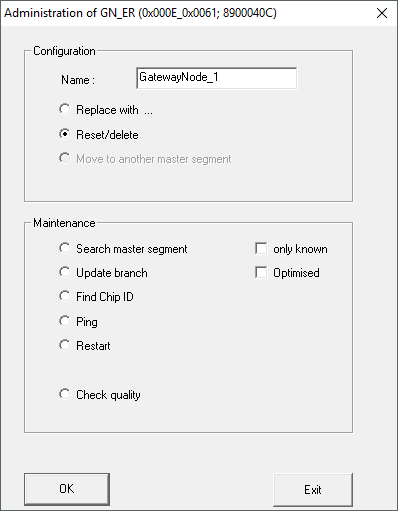
- Select the option
 Reset/delete.
 - Click on the button OK.
- Window Administration closes.
- Click on the button Save.
- Click on the Exit button.
- Open the Gateway Node configuration website (see Open configuration page).
- Reset the TCP settings of the GatewayNode there via ADMINISTRATION and FACTORY.
- GatewayNode reset.