Unique ID mode - Step-by-Step WO
- selected.
- From the drop-down menu , select the entry SI-Tool: Card data - Unique ID [offen].
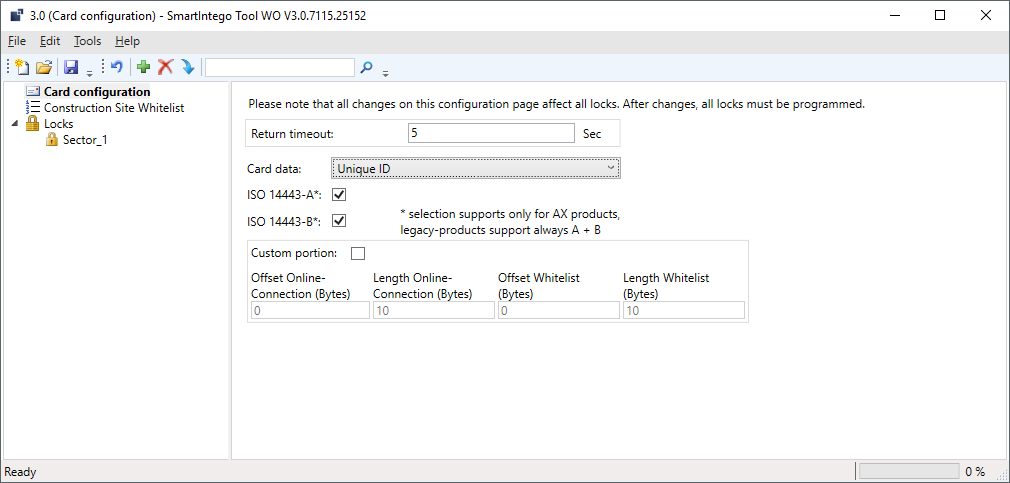
- If necessary: In the area, SI-Tool: Kartenkonfiguration - Custom portion [offen] specify which data of the UID should be used (see table). These settings are specified by the integrator (see also Entering card data).
- Assign a password (see Protecting card configuration).
- Unintentional changes excluded.
In the area, SI-Tool: Kartenkonfiguration - Custom portion [offen] you specify which contiguous bytes of the identification number should be read out from the locking device. Normally, the entire identification number is evaluated; restrictions are specified by the card manufacturer or the integrator.
SI-Tool: Kartenkonfiguration - Offset Online Connection (Bytes) [offen] | SI-Tool: Kartenkonfiguration - Length Online Connection (Bytes) [offen] | SI-Tool: Kartenkonfiguration - Offset Whitelist (Bytes) [offen] | SI-Tool: Kartenkonfiguration - Length Whitelist (Bytes) [offen] |
|---|---|---|---|
|
|
|
|
The exact parameters can be found in the documentation of your integrator system.