SmartHandle: Configure Escape&Return - Step-by-Step WO
All SmartHandles with sensors or ER options also support the escape and return function.
- You have successfully set up the infrastructure for locking with SmartIntego Manager.
- You have imported the data into the SmartIntego tool.
- Locking devices were automatically created by the import.
The SmartIntego tool (WO) does not yet recognise the locking device as an escape-and-return locking device. Perform the detection using one of these methods:
- Read out the locking device (button Read).
- Programme the locking device (button Program).
Escape and return settings will then be active.
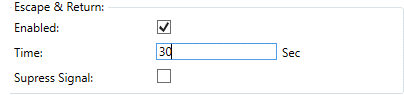
| Activates/deactivates the escape and return function. |
SI-EscapeReturn: Time [offen] | Specifies the duration of engagement (30 s to 240 s). SmartHandle beeps continuously during this time. |
| Disables beeping during engage time. |
 SI-EscapeReturn: Enabled [offen]
 SI-EscapeReturn: Suppress Signal [offen]
NOTE

Escape & Return: Legal situation
The Escape & Return Timeout can be between 30 s and 240 s. The use and configuration of Escape & Return may be subject to legal regulations (e.g. Norway).
- Inform yourself in advance about legal regulations.
Save the escape and return settings in the locking device by programming the locking device with the button Program.
The user can disengage the locking device manually (and thus cancel the escape and return function) by holding their card in front of the card reader of the locking device for two seconds.