Setting the time on several locking devices - Step-by-Step WO
- SmartIntego-Tool (WO) opened.
- Locking devices can be accessed via WaveNet.
- Click on the entry of a sector or root node of all locking devices in the navigation area.
- In the drop-down menu, select whether you want to synchronise the locking devices of all GatewayNodes or only the locking devices of a specific GatewayNodes.
- Use the options
 SI-Tool: Mehrere programmieren "Alle Schließungen" [offen], SI-Tool: Mehrere programmieren "Schließungen mit Programmierbedarf" [offen] or SI-Tool: Mehrere programmieren "Schließungen ohne Programmierbedarf" [offen] to specify which locking devices of the GatewayNode you want to synchronise.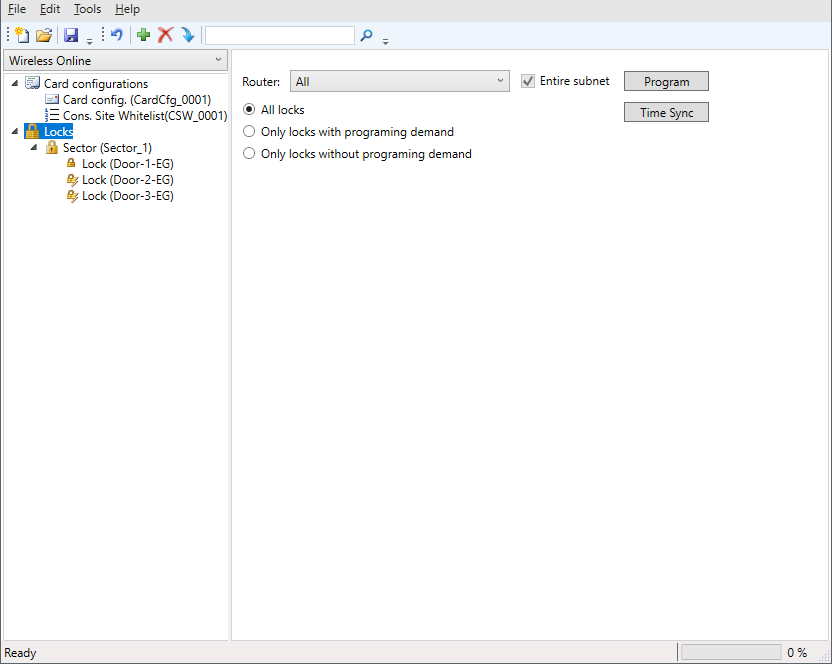
- Click on the Time Sync button.
- Time is synchronized via WaveNet (approx. 10 seconds locking device).
- Time is synchronized.