TCP Keep Alive (set timeout) - Step-by-Step WO
The TCP connection between the integrator system and GatewayNode is automatically terminated after 30 seconds of inactivity. However, the integrator system must maintain the connection. For this purpose, the integrator system sends a monitoring command to the GatewayNodes every 15 s to 25 s. If the integrator deviates from this value, the timeout value in the GatewayNodes must be extended (see also the integrator system documentation):
- Configuration page opened (see Open configuration page).
- Via CONFIGURATION select the entry .
- The configuration area opens.
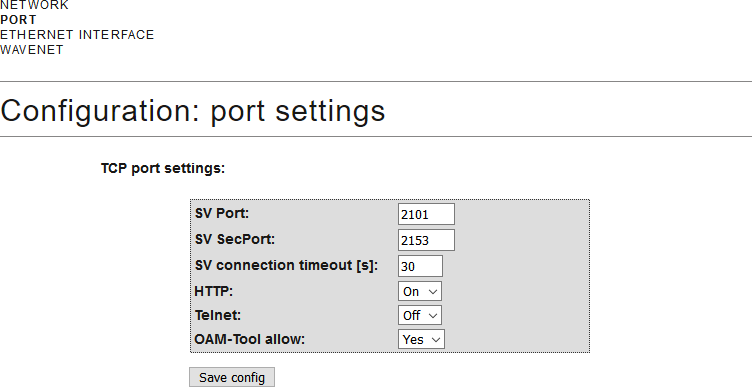
- Enter the desired timeout SV connection timeout [s] value in the field.
- Click on the button Save.
The GatewayNode can also attempt to maintain the connection itself after 27 s to 30 s. In this case, enter 0 as the timeout value. In contrast to handling by the integrator system, the GatewayNode has no error handling in this case and does not send notifications of success/failure.