Setting up SmartIntego Manager - Step-by-Step WO
You program the WaveNet configuration of the components using SmartIntego Manager.
IMPORTANT
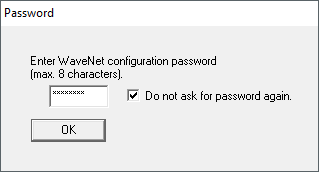
Password assignment at first start
You can only assign the password when you first start the WaveNet Manager. If you do not assign a password when you first start the WaveNet Manager, you will not be able to assign a password afterwards. The password is then empty.
- Assign a password the first time you start the WaveNet Manager.
- TCP/RS-485 configuration of GatewayNodes completed.
- Assign a WaveNet password at the first start. (This password protects the WaveNet configuration of all SmartIntego components).
NOTE

Loss of passwords
Your passwords are the basis for managing your locking system. Lost or publicly known passwords are a serious security risk and/or lead to loss of control over the system.
- Make a note of your passwords.
- Store your passwords in a safe place.
- If you no longer wish to be asked for the password in the future, activate the checkbox
 Do not ask for password again.