Programme hybrid locking devices - Step-by-Step WO
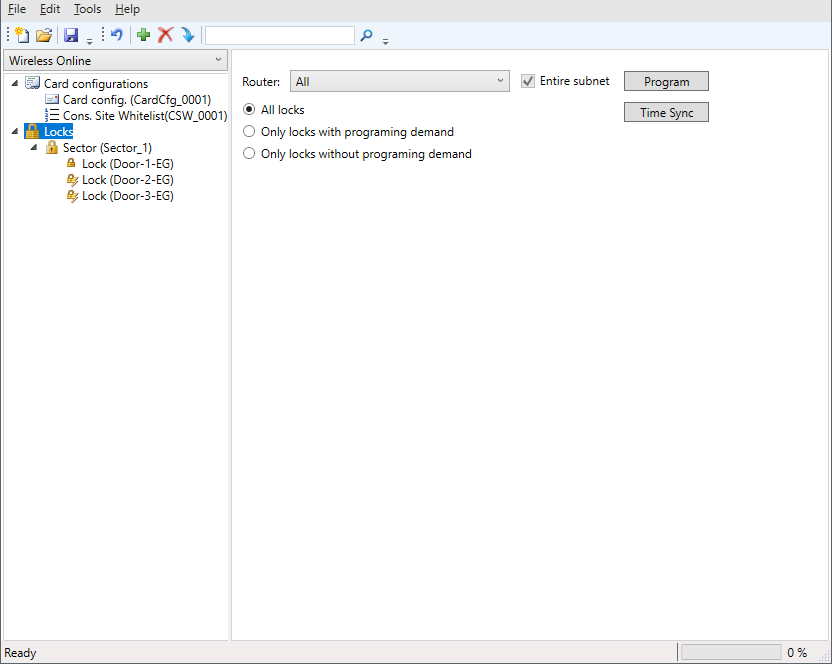
Select the locking devices tab in the navigation area. You can configure programming tasks for the locking devices in the drop-down menu :
- SI-Tool: Mehrere programmieren "Alle Schließungen" [offen]
- SI-Tool: Mehrere programmieren "Alle Schließungen an einem bestimmten Gateway/Router" [offen]
- SI-Tool: Mehrere programmieren "Schließungen mit Programmierbedarf" [offen]
- SI-Tool: Mehrere programmieren "Schließungen ohne Programmierbedarf" [offen]
- SmartIntego-Tool (WO) opened.
- When programming the first locking device in the system: SI.SmartCD connected.
- Select the locking devices tab in the navigation area.
- Select which locking devices you want to programme from the drop-down menu .
- Click on the Program button.
- Programming via WaveNet starts.
- Duration of programming: 45 seconds (locking cylinder) or 80 seconds (SmartHandle).
- Locking devices are programmed in succession.
- Locking devices are programmed.
The SI.SmartCD cannot be used for initial programming, but must be connected.
Do not perform any major updates (e.g. major whitelist update) through the integrator system during programming.