Card data usage mode: MIFARE Classic - Step-by-Step WO
- SmartIntego-Tool (WO) opened.
- selected.
- From the drop-down menu, selectSI-Tool: Card data - Data from Setup [offen].
- Specify the number of card configurations (card setups) used in the system (up to 5).
- In the dropdown menu select the entry SI-Tool: Card type - MIFARE Classic [offen].
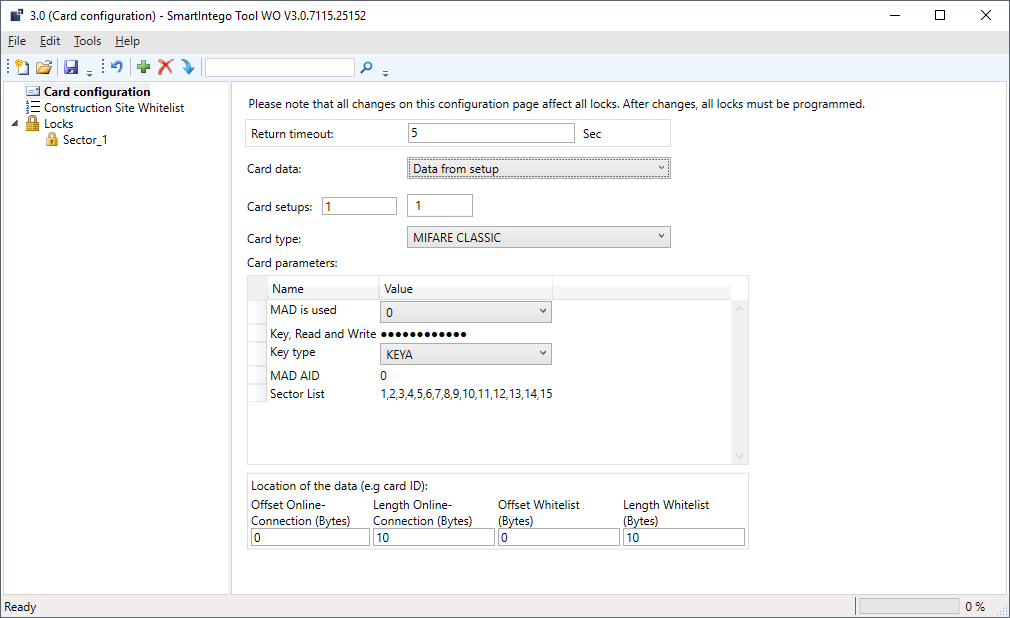
- Enter the card parameters in the area SI-Tool: Kartenkonfiguration - Card parameters [offen] in order to be able to read the card data. These settings are specified by the integrator (see alsoEntering card data).
- In the section, SI-Tool: Kartenmanagement - LOcation if the data (e.g. card ID) [offen] specify where the data is located on the card (see table). These settings are specified by the integrator.
- Repeat steps 3, 4 and 5 for all cards with other MIFARE Classic data records.
- Assign a password (see Protecting card configuration).
- Unintentional changes excluded.
Data to be entered:
- MAD or sector based
- Readkey to read the data (read and write keys are sometimes the same)
- Selection of key (A or B)
- MAD AID: If "MAD is used" = 1
- Sector List: If "MAD is used" = 0 (sector in which the ID of the card is located)
The locking device should not read out the entire data record of the card. It only requires a number (max. 32 bytes) that uniquely identifies the card. In the area SI-Tool: Kartenmanagement - LOcation if the data (e.g. card ID) [offen] you specify which related data should be read out from the locking device.
SI-Tool: Kartenkonfiguration - Offset Online Connection (Bytes) [offen] | SI-Tool: Kartenkonfiguration - Length Online Connection (Bytes) [offen] | SI-Tool: Kartenkonfiguration - Offset Whitelist (Bytes) [offen] | SI-Tool: Kartenkonfiguration - Length Whitelist (Bytes) [offen] |
|---|---|---|---|
|
|
|
|
The exact parameters can be found in the documentation of your integrator system.