TCP: Add multiple GatewayNodes (Broadcast) - Step-by-Step WO
- All GatewayNodes powered and mounted.
- TCP configuration completed (see Configuring GatewayNodes (TCP)).
- Configuration PC and all GatewayNodes on the same (IP)subnet.
- SmartIntego Manager opened.
- Right-click on the navigation root (WaveNet_XX_X).
- The window Administration opens.
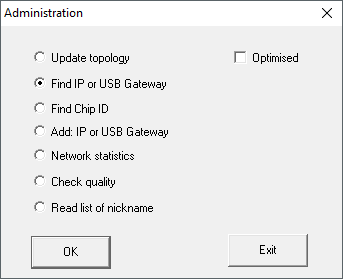
- Select the option
 Find IP or USB gateway.
 - Click on the button OK.
- Window Administration closes.
- SmartIntego Manager searches for reachable GatewayNodes.
- SmartIntego Manager adds all accessible GatewayNodes.
- Right-click the entry of the new GatewayNode.
NOTE

Name assignment by name list
If you are using a name list (Creating, expanding and importing a name list see), you no longer need to name the GatewayNodes.
- The window Administration opens.
- Specify the name of your GatewayNode.
- Click on the button OK.
- Window Administration closes.
- Click on the button Save.
- SmartIntego Manager contacts the GatewayNode.
- SmartIntego Manager assigns GatewayNode device address.
- SmartIntego Manager saves routing table in the GatewayNode.
NOTE
Data loss due to improper termination
The data is not transferred to the SmartIntego tool (WO) until the SmartIntego Manager is properly ended. After saving, the files are permanently saved in the * ikp file in the SmartIntego tool (WO).
- Click on the Save button.
- Close SmartIntego Manager correctly using the button Exit.