Move individual locking device - Step-by-Step WO
- SmartIntego Manager opened.
- Locking device reachable from new GatewayNode.
- Right-click the entry of the GatewayNode to which you want to relocate the locking device.
- The window Administration opens.
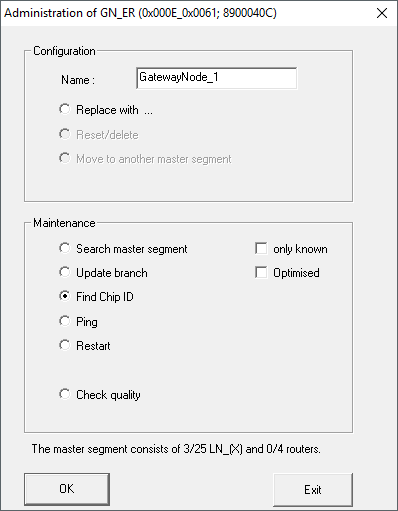
- Select the option
 Find Chip ID.
 - Click on the button OK.
- Window Administration closes.
- The window Search for node opens.
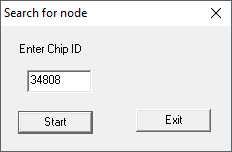
- Enter the LockNode chip ID without leading zeros.
- Click on the Start button.
- Window Search for node closes.
- SmartIntego Manager searches for LockNode.
- Window Search results opens with RSSI values.
- Select the GatewayNode to which you want to move the locking device (usually the GatewayNode with the best RSSI value).
- Click on the button OK.
- Window Search results closes.
- Note on resetting after relocation opens.
- Confirm the notification message.
- Note on resetting after relocation closes.
- LockNode is reset.
- Locking device is displayed for the new GatewayNode.
- Click on the button Save.
- Click on the Exit button.
- Locking device has relocated.
NOTE

Different procedure for Mercury components
Mercury GatewayNodes will change the device address (LockNodes) when moving.