Use RS-485 ConfigNode in various projects - Step-by-Step WO
- SmartIntego Manager opened (see Setting up SmartIntego Manager).
- Reset the WaveNet settings of the ConfigNode (hardware reset, see Resetting the WaveNet/network configuration of the GatewayNode).
- Connect the ConfigNode in the second project.
- Determine the IP address (see Search GatewayNode).
- In SmartIntego Manager, right-click the ConfigNode entry.
- The window Administration opens.
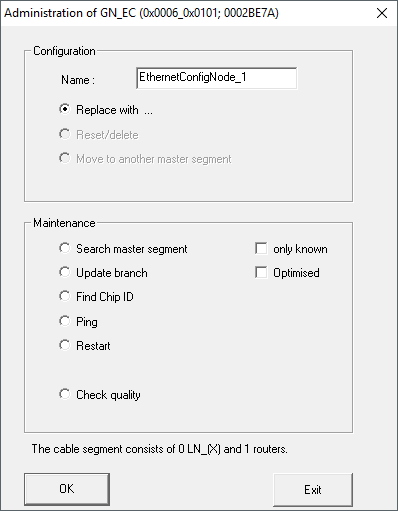
- Select the option
 Replace with.
 - Click on the button OK.
- The window Add IP or USB Gateway opens.
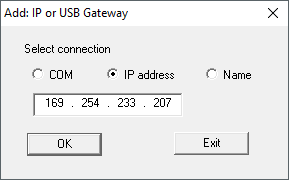
- Enter the IP address determined for the ConfigNode.
- Click on the button OK.
- Window Add IP or USB Gateway closes.
- ConfigNode is described with the data of the project.
- ConfigNode set up for second project.