Change DNS name or IP address of a GatewayNode - Step-by-Step WO
To do this, first change the DNS name or IP address via the configuration website of the GatewayNode (see Open configuration page. Resolving host names requires a functioning DNS server and creates an additional dependency. Therefore, avoid host names.
Then replace the GatewayNode with the same GatewayNode with the new IP address or host name:
- SmartIntego Manager opened.
- Right-click on the entry of the corresponding GatewayNode.
- The window Administration opens.
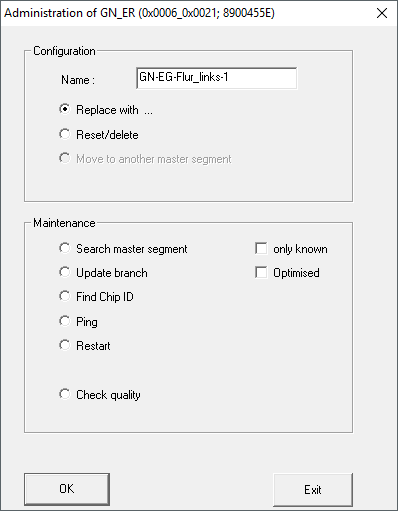
- Select the option
 Replace with
 - Click on the button OK.
- Window Administration closes.
- The window Add IP or USB Gateway opens.
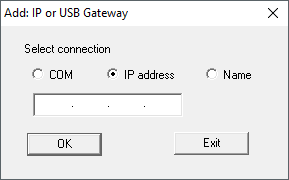
- Select the option IP address or Name.
- Enter the new IP or host name.
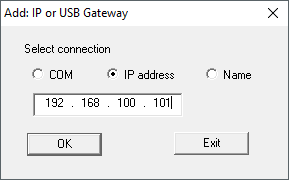
- Click on the button OK.
- Window Add IP or USB Gateway closes.
- IP address or host name of the GatewayNode replaced.
- GatewayNode displayed in overview with new IP address or host name.
- Click on the button Save.
- Click on the Exit button.
- Configuration saved with new IP address or host name.