Overview - WaveNet
You can see the topology of your WaveNet in the WaveNet Manager on the start page.
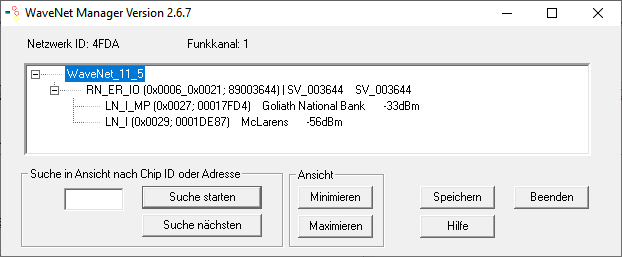
The overview provides the following information:
Router node
- RouterNode type (e.g. RN_ER_IO)
- Input address (for example 0x0006)
- Chip ID (e.g. 89003644)
- Host name (If you do not use host names, the IP address is displayed instead of the host name).
- RSSI value (if radio interface only. Not used in the example)
LockNode
- LockNode type (e.g. LN_I)
- Address (e.g. 0x0027)
- Chip ID (e.g. 00017023)
- Name of the linked locking device
- RSSI value (e.g. -33 dBm)
You can determine the segments with the displayed address (see Addressing).
Number of device types
The WaveNet Manager provides you with a way to display the number of different device types.
- WaveNet Manager opened via LSM (see Best Practice: From the LSM software)
- Right click the entry WaveNet_XX_X.
- The window Administration opens.
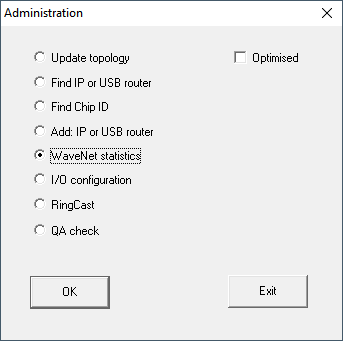
- Select the option
 WaveNet statistics.
 - Click on the OK button.
- The Administration window closes.
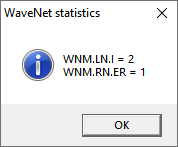
- The window WaveNet statistics opens. You will see a list of device types with the number.
Memory status
The overview also shows the memory status of the devices.
Bold | WaveNet entry changed, but not yet saved. Click on the button Save. |
Normal | Entry saved in WaveNet |
Configuration status
You can recognise problems by the configuration of RouterNodes or LockNodes by a black flash in front of the respective entry. Repeat the configuration by reprogramming the device (see Reprogram or replace the device).