RouterNode: Analogue input - WaveNet
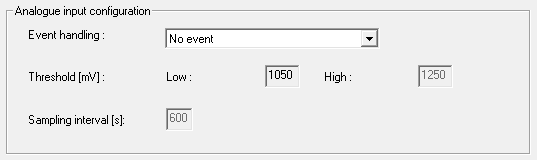
In the drop-down list you can set when a voltage change at the analogue input of the RouterNode triggers an event (see RouterNode: Digital output).
No event | Standard entry: The RouterNode does not respond to an applied signal. |
If too high | If the voltage applied rises, it will at some point exceed the threshold value for exceeding it. At this moment the event is triggered. |
If too low | If the applied voltage decreases, then at some point it falls below the threshold for falling below. At that moment, the event is triggered. |
If too high/too low | If the applied voltage changes and the following scenarios occur, then the event is triggered.
|
With the sampling interval you can specify how often the applied signal is compared with the threshold values.
NOTE

200 mV hysteresis band
The analogue signal applied may be susceptible to interference and fluctuate slightly depending on its nature. If the thresholds were too close together, even small changes in the voltage would trigger several unintended events in succession.
The WaveNet Manager automatically sets the threshold value for falling below the threshold for exceeding by 200 mV (hysteresis). This increases the operational reliability of the RouterNode.
Without hysteresis, the same voltage curve will cause the threshold to be exceeded twice.
With hysteresis, the same voltage curve triggers exactly one overshoot. The overshoot is only detected again after the voltage has fallen below the thresholds.