LockNodes - WaveNet
Restarting LockNodes in the WaveNet Manager
- WaveNet Manager opened via LSM (see Best Practice: From the LSM software)
- LockNode connected to WaveNet (see Adding Lock Nodes to WaveNet).
- Right-click on the entry of the LockNode you want to restart.
- The window Administration opens.
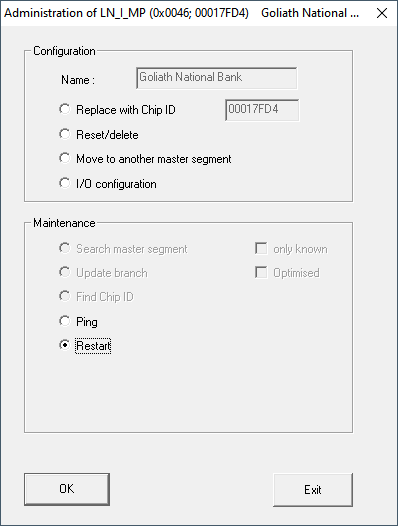
- In the area Maintenance select the option
 Restart.
 - Click on the OK button.
- The Procedure started window opens temporarily.
- LockNode will restart.
- LockNode is restarted.
Restarting LockNodes via power connection
Your LockNodes are reset and restart when you disconnect the power (or remove the LNI), wait half a minute and reconnect (or reinstall the LNI). After the restart the LockNodes beep four times.