Run AXM as the administrator (recommended) - AXM Plus
SimonsVoss recommends that you always start AXM Plus as the administrator. This ensures potential problems due to lack of access and write permissions can be avoided from the outset:
Manual start as administrator
- AXM Plus installed.
- Administrator rights available.
- Locate the shortcut or the AXM Plus icon.

- Right-click on the shortcut menu to open the context menu.
- Click on the entry with your name.
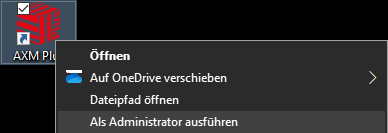
- AXM Plus runs as the administrator.
Automatic start-up as the administrator
Starting manually as the administrator has two disadvantages:
- Inconvenient.
- You might forget to start AXM Plus as the administrator.
Consequently, SimonsVoss recommends that the properties of the link to AXM Plus be set so that the AXM Plus is always run as administrator using this shortcut.
- AXM Plus installed.
- Administrator rights available.
- Locate the shortcut or the AXM Plus icon.
- Right-click on the shortcut menu to open the context menu.
- Click on the entry with your name.
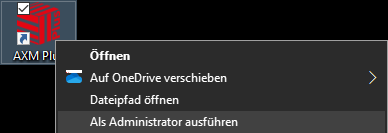
- The AXM ... Properties window will open.
- Go to the Link tab.
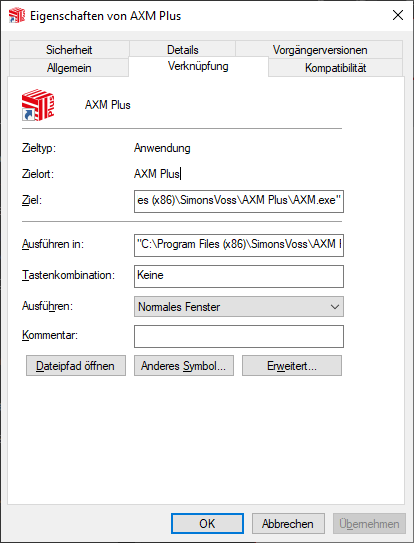
- Click on the Advanced... button.
- The Advanced Properties window will open.
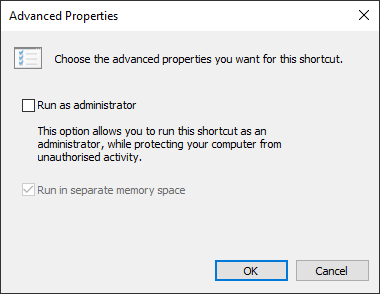
- Activate the
 Run as administrator checkbox.
 - Click on the OK button.
- Window Advanced Properties closes.
- Click on the OK button.
- Window AXM ... Properties closes.
- If you start AXM Plus via this link in the future, AXM Plus will automatically run as the administrator.