Checking the connection between database and cloud - AXM Plus
Certain cloud-based functions only work if your AXM Plus‘s database, the AXM service and the SimonsVoss cloud are connected.
You can easily check this connection in the lower bar of your AXM Plus:

The entry indicates either or .
In the event of , you can re-establish the connection by restarting the AXM service and linking your AXM Plus to your SimonsVoss ID again:
- Administrator rights available.
- AXM not opened.
- Open the Windows window Services with administrator rights.
- Restart the SimonsVoss AXM Plus service.
- Right-click on the service to open the context menu and restart the service.
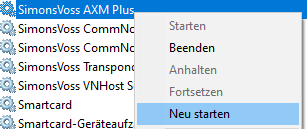
- SimonsVoss AXM Plus restarts.
- Launch the AXM Plus and log on to the project.
- Reconnect your SimonsVoss ID to your AXM Plus again (as described in Registration ).
- Then check the entry again using .