Time switch-over function - SmartRelay 3 system
IMPORTANT
Unintentional opening due to use with SmartOutput module
The opening behaviour with a SmartOutput module in conjunction with time zone control deviates from the opening behaviour without the SmartOutput module.
All relays in the SmartOutput module are switched.
- See the sections on Extended configuration with SmartOutput modules and Extended configuration without SmartOutput module.
The fifth group in the time zone plan is relevant for time changeover.
Assignment of a time zone plan
- LSM launched.
- SREL3 ADV System added.
- Time zone plan added.
- Double-click on the SmartRelay 3 entry in the matrix to open the settings.
- Change to the Door tab.
- Open the drop-down menu.
- Select your time zone.
- Click on the Apply button.
- Click on the Exit button.
- Time zone is selected.
Activating time zone control and time changeover
Whereas time zone control itself can only influence identification media authorisations, the time changeover also activates time-dependent switching of the relay in the controller. Both need to be activated.
- LSM launched.
- SREL3 ADV System added.
- Time zone plan assigned.
- Double-click on the SmartRelay 3 entry in the matrix to open the settings.
- Change to the Configuration/Data tab.
- Enable the
 Time zone management checkbox.
 - Enable the Time switching checkbox.
- Click on the Extended configuration button.
- The Extended configuration window will open.
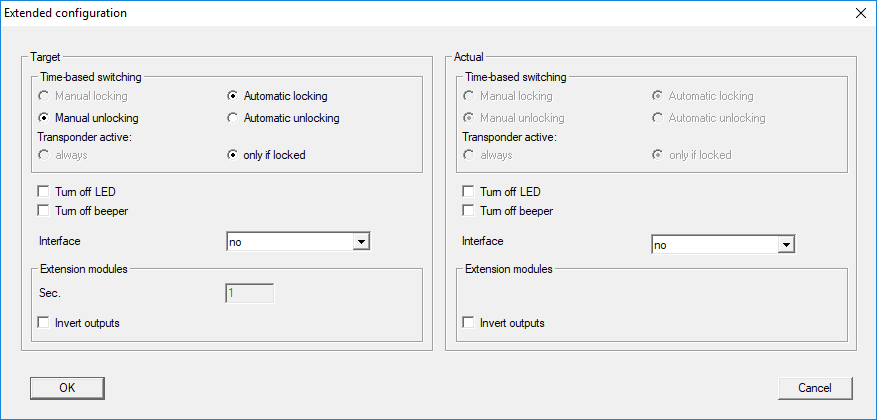
- Set the options for automatic and manual locking and unlocking in the Time-based switching section as you require (see Extended configuration without SmartOutput module and Extended configuration with SmartOutput modules).
- Click on the OK button.
- Window closes.
- Click on the Apply button.
- Click on the Exit button.
- Time zone control and time changeover are activated.
IMPORTANT
Activation within the authorised/non-authorised time period
Time changeover is always activated for the next full quarter of an hour. If programming takes place within a defined time period, the changeover is not implemented until the next full quarter of an hour within the defined time period. If the existing time zone plan allows the SREL3 ADV system to now be closed and the newly programmed time zone plan allows the SREL3 ADV system to now be open, opening does not come into effect until the next full quarter of an hour.
- Disconnect the power supply temporarily to activate the time changeover immediately.
- Ensure that there are no unauthorised accesses until the next full quarter of an hour.
Editing the time zone plan
See LSM manual to edit the time zone plan.