Problems with inputs or network readout/programming - SmartRelay 3 system
If the controller or LSM do not respond to inputs or readout and programming over the network fails, it may be that services are not running correctly. Proceed as follows in this case:
Restart services
- Controller has already been programmed.
- Components wired correctly (see wiring).
- Components connected to power.
- Press the Windows key.
- Enter services.
- Right-click on the displayed entry to open the context menu.
- Select the item.
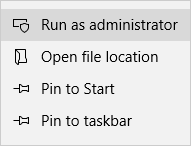
- Enter your user name and your password if necessary.
- The Windows Services window will open.
- Look for the following services: SimonsVoss CommNode Server and/or SimonsVoss VNHost Server.
- Right-click to open the services' context menu.
- Select the item.
Re-writing config files
You may need to re-write config files. To do so, open the corresponding communication node in LSM and re-write the config files.