Remote opening - SmartRelay 3 system
You can also use LSM to operate the relay in the controller without identification media at any time.
NOTE

A remote opening takes precedence over time zone control. It also operates the relay if the relay contacts should remain open after time zone control.
Remote opening with USB cable
- Controller has already been programmed.
- Components wired correctly (see wiring).
- Components connected to power.
- Use Network to select the item.
- The Activate network locks window will open.
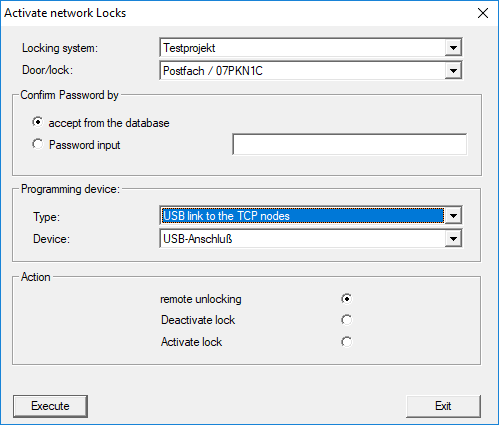
- Open the drop-down menu.
- Select the SREL3 ADV system controller.
- Open the drop-down menu.
- Select the USB link to the TCP nodes item.
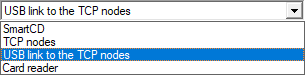
- Open the drop-down menu.
- Select the IP address if required.
- Select the
 remote unlocking option.
 - Click on the Execute button.
- Relay switches in the controller.
- Programming successful window is displayed.
Remote opening via TCP/IP
- Controller has already been programmed.
- Components wired correctly (see wiring).
- Components connected to power.
- Use Network to select the item.
- The Activate network locks window will open.
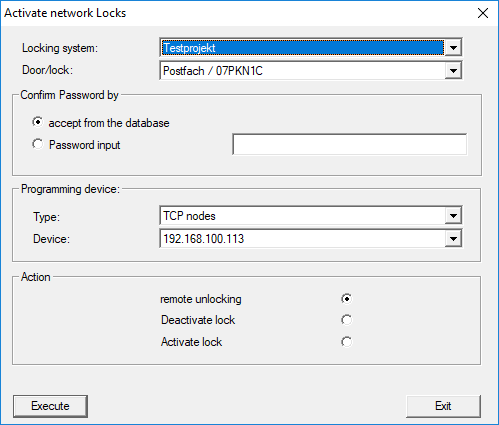
- Open the drop-down menu.
- Select the SREL3 ADV system controller.
- Open the drop-down menu.
- Select the TCP nodes item.
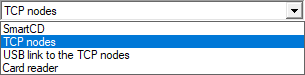
- Open the drop-down menu.
- Select the IP address if required.
- Select the remote unlocking option.
- Click on the Execute button.
- Relay switches in the controller.
- Programming successful window is displayed.