SmartRelay (G2): SREL.G2, SREL.W.G2, SREL2.G2 - LSM 3.6 SP1 Basic Online
This tab (Configuration/Data) is divided into two sides:
- The left side shows the target status of the locking device (Actual) – i.e. the desired status configured in the LSM software.
- The right side shows the locking device's current status (Target) – i.e. the status which was last programmed.
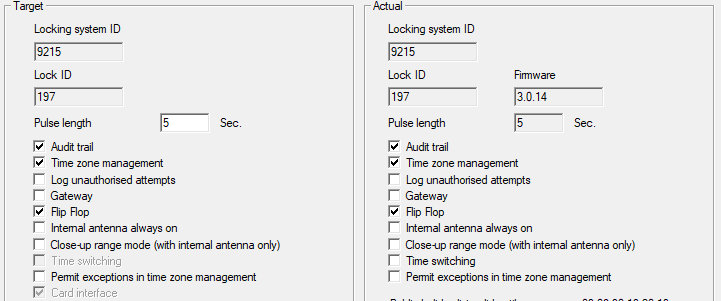
The following features can be enabled depending on the locking device type:
- Pulse length
- This where you indicate the number of seconds for the duration of switch pulse. The value can be set at 0.1 to 25.5 seconds. If you enter 3 seconds, for example, an electric strike is released for 3 seconds before it locks again.
- Access control
- ZK and ADV possible. The most recent transponder transactions are logged with the date and time.
- Logging unauthorised attempted access events
- For ZK and ADV only: Normally, only authorised transponder operations are logged. You need to select this option if you also wish to record attempts to open the door with non-authorised transponders.
- Gateway
- SmartRelay can be used as a gateway.
- Flip-flop
- Pulse mode (default setting) is switched off and the pulse duration no longer plays a role. When flip-flop mode is activated, SmartRelay changes its status from on to off or vice versa each time it is activated using a transponder. This mode is ideal for switching lights, machines and other systems on and off.
- Where applicable, you should ensure that mains adapters and electric strikes are suitable for continuous current operation in such an installation.
- Internal antenna always on
- Even if an external antenna is connected, the internal antenna is still used at the same time.
- Close range mode (for internal antennas only)
- Close range mode is activated.
- Permit exceptions in time zone management
- Exceptions are permitted in time zone management if this checkbox is enabled.
- Card interface
- This option is enabled for all G2 SmartRelays as standard. The LSM first adds a data record for an active locking device and checks whether the locking device has an interface during programming. If no card interface is detected, LSM automatically disables the checkbox. You no longer need to indicate whether you have an active or hybrid SmartRelay G2 for LSM 3.3 or higher.
NOTE

If you change the card interface setting manually, automatic detection will no longer function and warning messages will be emitted.
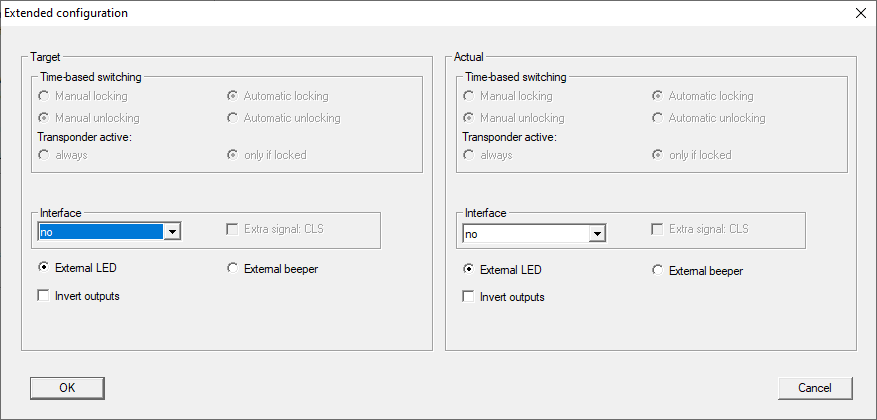
Some settings can be specified using the "Extended configuration" button:
- Interface
- You can enter the type of card reader here which the SmartRelay is to simulate for operation as a serial interface.
- The following options are available:
- Wiegand, 33 bit
- Wiegand, 26 bit
- Primion
- Siemens
- Kaba Benzing
- Gantner Legic
- Isgus
- External LED/external beeper
- For SREL.ADV only: This indicates which external component group is connected. In flip-flop mode, SmartRelay emits a permanent signal when switched on if there is an external LED; if there is a beeper, an audible signal is only emitted when there is a change of status.
- Invert outputs
- You can use these settings to invert the relay output.