Creating components and setting up LSM - LSM 3.6 SP1 Basic Online
Before you start setting up LSM, the most important settings for operating a network must be configured in the LSM software and the RouterNode 2 must be ready for use.
- Preparing the LSM software
- Preparing hardware
- Creating communication nodes
- Setting up Task services
- Create different identification media (e.g. Add new transponder) and locking devices (e.g. Add new locking device).
- Perform initial programming of the components created (Programme transponder and Programme locking device).
- Create a SmartRelay 2 G2 ( G2_SmartRelay active/hybrid).
- Open the locking device properties.
- Change to the "Configuration/Data" tab.
- Activate the
 Gateway check box.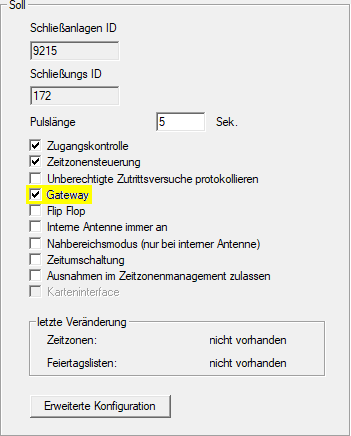
- Switch back to the matrix view.
- Authorise all identification media on SmartRelay 2 G2 which are to receive new authorisations there at a later point in time.
- Carry out initial programming of the SmartRelay 2 G2.
- Ensure that a LockNode is installed in the SmartRelay 2 G2.
- Set up RouterNode 2 using WaveNet Manager (see Setting up the network and importing into LSM).
- Assign the gateway (or SmartRelay 2 G2) to it.
- The virtual network is now ready for use.