Configuration/Data - LSM 3.6 SP1 Basic Online
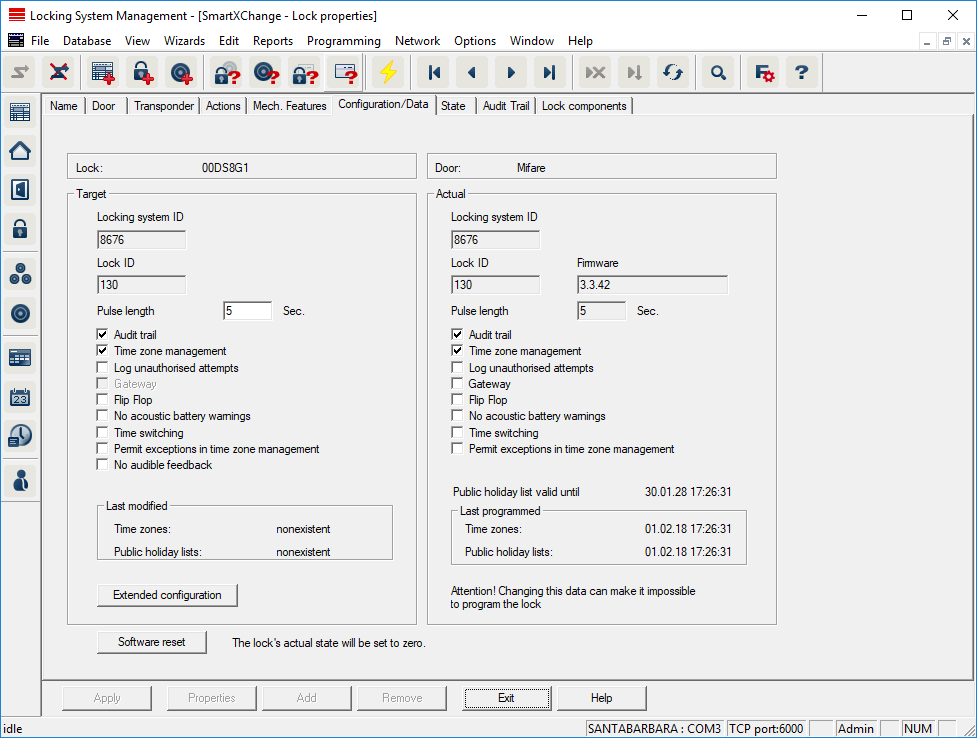
This tab is divided into two sides:
- The left side shows the target status of the locking device – i.e. the desired status configured in the LSM software.
- The right side shows the locking device's current status – i.e. the status which was last programmed.
The following features can be enabled depending on the locking device type:
- Access control
- Option to log access events. This function only works for components with an access control function.
- Clarify whether the use of this option is allowed in your own particular environment, e.g. with the Works Council or the Data Protection Officer.
- Logging unauthorised attempted access events
- Rejected transponder bookings are retained in the locking device. This only applies to ID media which belong to the same locking system.
- Gateway
- Option for using gateways. Only available with SmartRelay.
- Flip-flop
- When a transponder is enabled, the locking device engaged ready for use and remains engaged until a transponder activates it again.
- No audible battery warnings
- If this function is enabled, there are no audible warnings indicating the battery status in components.
- No audible programming acknowledgement signals
- The locking device does not acknowledge the process with audible signals when programming.
- Card interface
- Links card interface with locking device.
- Extended configuration
- Make advanced configuration settings, such as a time-controlled changeover of the locking device.
- Software reset
- Button to re-set the current status of the LSM software. This process is timed and shown on the left-hand side.