Transponder group - LSM 3.6 SP1 Basic Online
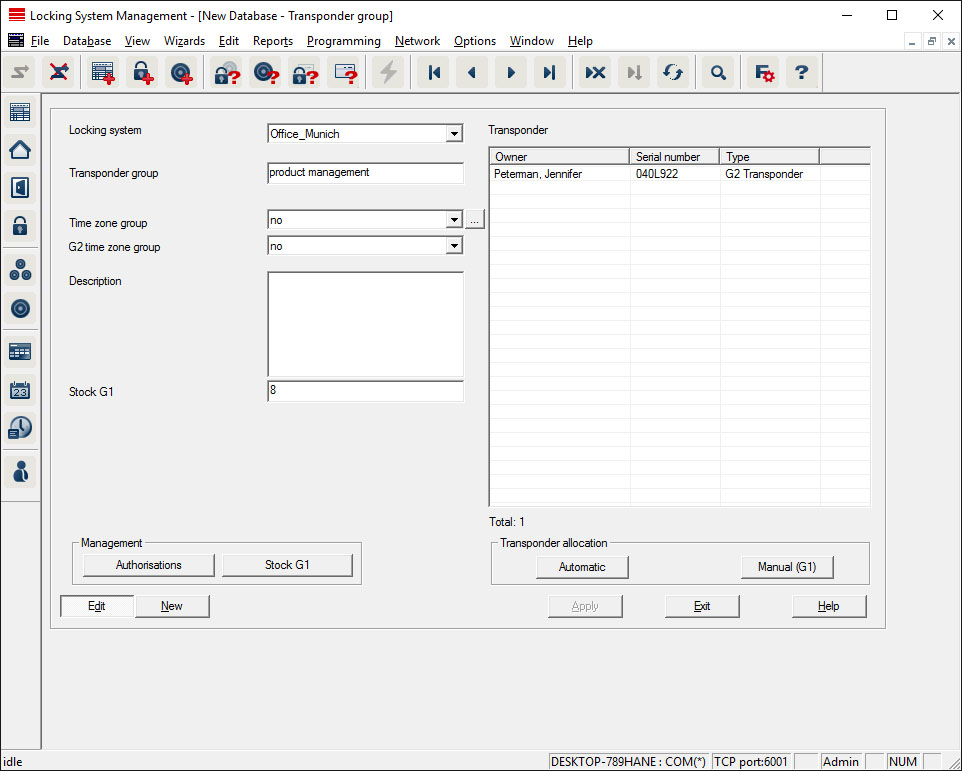
This menu displays the transponder groups already added. You can use the "Next dataset" and "Previous dataset" buttons on the menu ribbon to switch between individual transponder groups. You can use the "New" button to add more transponders.
- Locking system
- Selects the locking system added.
- Transponder group
- The transponder group name.
- Description
- Blank field to describe the transponder group.
- G1 reserve
- Total number of transponder IDs available in the transponder group.
- Authorisations
- Option of issuing the group authorisations.
- Reserve (G1)
- Option to manage G1 transponder IDs.
- Automatic
- Option to automatically assign a free transponder to the transponder group.
- Manual (G1)
- Option to assign a specific transponder to a specific transponder ID manually.