Name - LSM 3.6 SP1 Basic Online
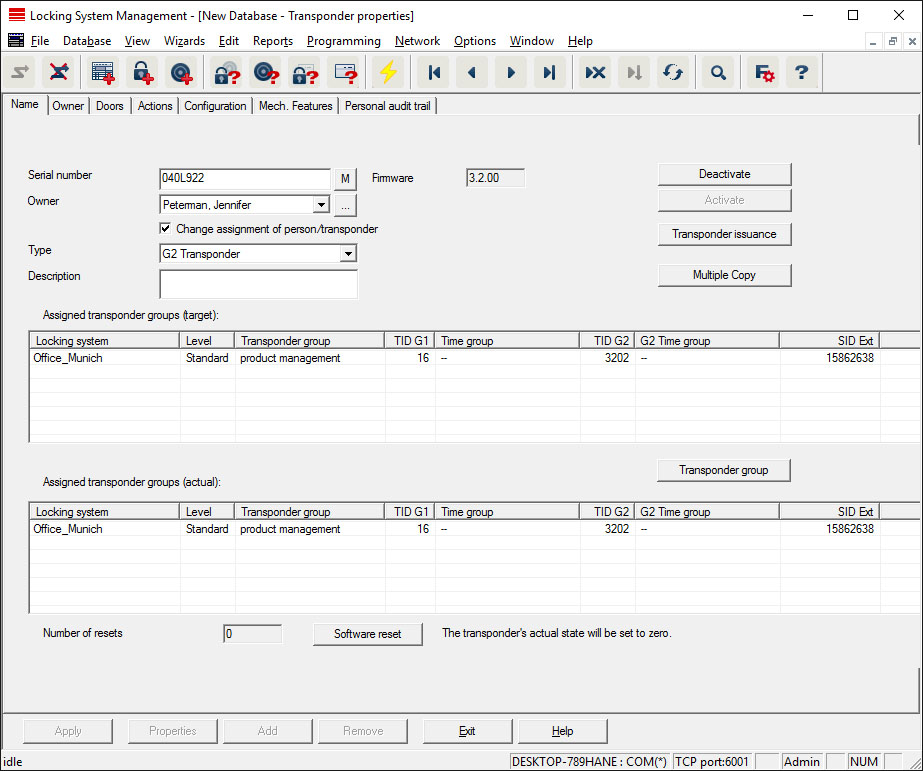
- Serial number
- Transponder serial number. The "..." button shows the person's properties. The G2 transponder "internal serial numbers" (PHI numberPhysical Hardware Identifier; embossed on the product) are automatically applied when they are programmed.
- Holder
- The person that the transponder is assigned to. The "M" button shows the transponder in the matrix.
- Type
- Type of transponder.
- Description
- Blank field to describe the transponder.
- Assigned transponder groups: Target state
- Target status of the transponder group to which the transponder belongs.
- Transponder group
- You can use this button assign the transponder to another transponder group.
- Assigned transponder groups: Current status
- Current status (last programming) of the transponder groups to which the transponder belongs.
- Software reset
- Button to re-set the current status of the LSM software. This process is timed and shown on the left-hand side.
NOTE

Only use this function if you are sure where the programmed components are. This action can be used if a transponder is defective. A correctly programmed, functional transponder which has only be reset in the software may still be authorised to operate locking devices. This poses a high security risk!
- Disable
- Button to disable a transponder.
- Activate
- Button to activate a transponder.
- Issuing of transponders
- Generates a form with signature for handover. The form also contains a list of all authorised doors.
- Make multiple copies
- Generates as many copies of the transponder with the same properties as required.