CISA - Digital SmartHandle AX
- Remove the panic bar as described in the manufacturer's documentation except for the adapter plate.
NOTE

Third party product with own documentation
The panic bar holder is a third-party product.
- Please follow the manufacturer's instructions and safety instructions.
- Unscrew the screws of the mounting plate.
- Pull out the fitting with the adapter plate and the square.
- SmartHandle AX is removed from the door.
- Unscrew the screws that fix the SmartHandle AX to the adapter plate.
- Adapter plate is removed.
- Push the locking pin of the square inward and pull the square out of the assembly.
- The square is removed.
Removing the handle from the assembly
- Insert the Allen wrench into the hole provided in the square socket.
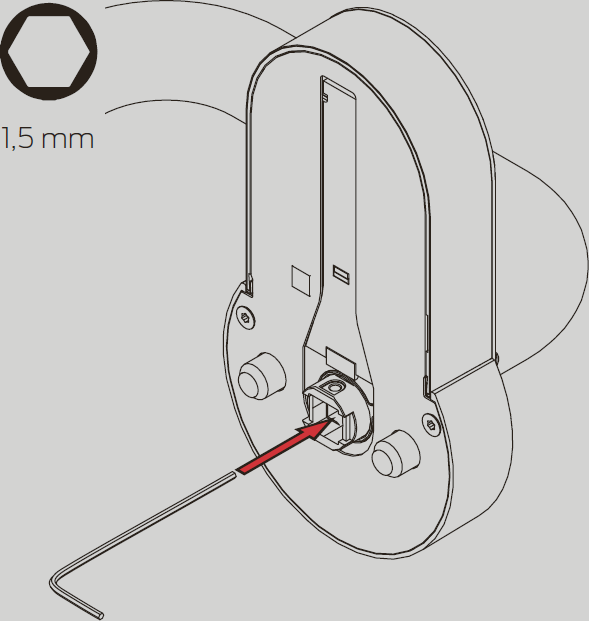
- Push the Allen wrench towards the nearer edge and hold it pressed.
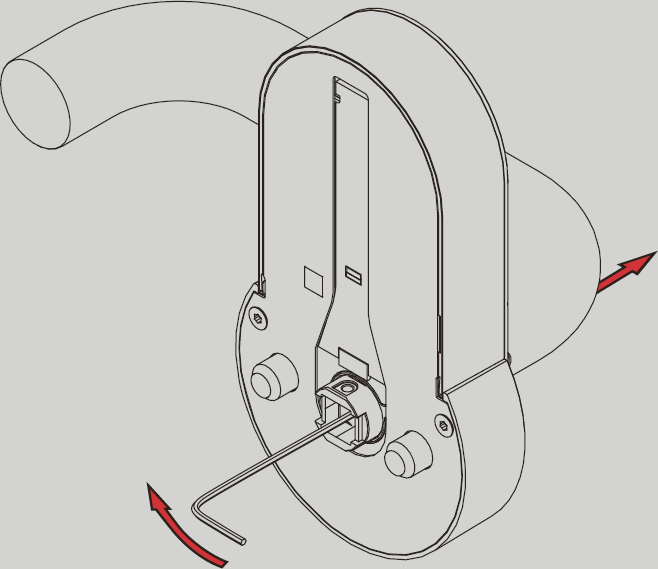
- Remove the handle from the assembly.
- SmartHandle AX is disassembled.