Configuration interface - RouterNode 3
Your RouterNode 3 comes with an embedded web server that provides an easily accessible configuration interface. By default, this configuration interface is accessible via HTTPS with any web browser.
You can perform the following actions, for example:
- Changing your password
- Configure the operating mode (Operating with DHCP or Operation with fixed IP address)
- Restarting
- Evaluate statistics
- Update firmware
Launch the configuration interface
The exact process depends on whether you operate your RouterNode 3 with a DHCP server or with a fixed IP address.
- Open a browser of your choice.
- If you are operating the RouterNode 3 with a fixed IP: enter this IP in the address line and press Enter to confirm your input.
- If you are operating the RouterNode 3 with a DHCP server: enter the https:/hostname (e.g. https://sv123456).
If the configuration web page does not open, enter https://hostname.local (e.g. https://sv123456.local). - Your RouterNode 3‘s configuration web page will open.
- Enter your login data (see sticker on circuit board and housing for SimonsVoss user name and default password).
- Configuration web page is open.
Security notifications
A web server embedded in the RouterNode 3 provides the configuration interface. A direct Internet connection to the RouterNode 3 is not provided. For this reason, the embedded web server uses a TLS certificate issued by SimonsVoss instead of by a public certification authority.
For this reason, a security warning may be displayed the first time you launch the configuration interface, e.g.:
- SEC_ERROR_UNKNOWN_ISSUER (Firefox)
- NET::ERR_CERT_AUTHORITY_INVALID (Chrome)
- DLG_FLAGS_INVALID_CA (Edge)
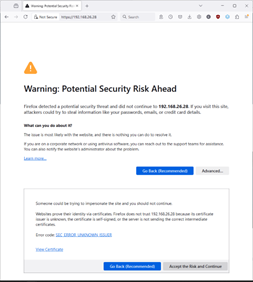
This safety alert is normal. It is safe to confirm the security message or accept the risk and continue.
You can permanently avoid the security warning by adding the certificate to the collection of trusted root certification authorities in your browser. The certificate required for this can be obtained on request from SimonsVoss.