Port and protocol settings - RouterNode 3
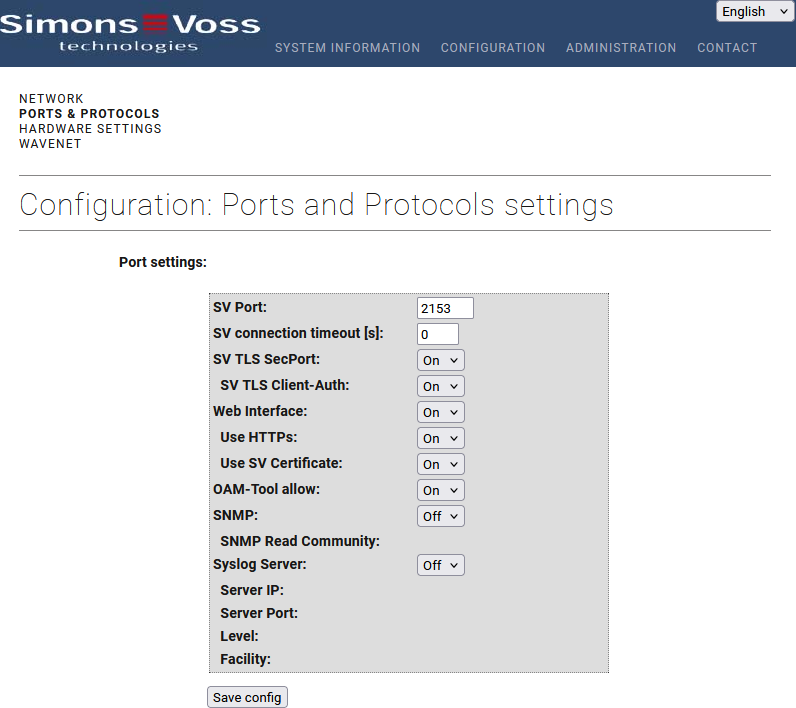
This page is used to set the other network parameters of the RouterNode 3.
SV port: | TCP port through which the embedded WaveNet server may be addressed, for example by a client with WaveNet Manager. Default value: 2101 (2153 with TLS SecPort enabled). Do not change this setting; otherwise, the software on the client will no longer be able to communicate with RouterNode 3. |
SV time-out [s] | Timeout of the TCP connection to the embedded WaveNet server. Default value: 0. |
SV TLS SecPort | On/Off – Enables/disables TLS encryption for the embedded WaveNet server. Default value: Off. For more information, see Enable TLS encryption. |
SV TLS Client Authentication | On/Off – Enables/disables TLC client authentication for the embedded WaveNet server. Default value: Off. For more information, see Enable TLS encryption. |
Web Interface | On/Off - Enables/Disables the embedded web server RouterNode 3that provides the configuration interface. Default value: On. |
Use HTTPS | On/Off - Enables/disables HTTPS for the RouterNode 3 embedded web server. The configuration interface can then only be accessed with an HTTPS connection, depending on the setting. Default value: On. |
Use SV certificate | The 'On/Off' setting determines whether the connection to the embedded web server should use the RouterNode 3 standard or a custom certificate. Default value: Off. This is normally only enabled once the TLS connection to the software using your own certificates has been fully set up. This prevents lockout due to faulty certificates. |
Enable OAM tool | On/Off - Enables/disables the protocols required for the RouterNode 3 to be found on the local area network (LAN) using hostname. More information; see Determine IP address with hostname. |
SNMP SNMP read community | On/Off - Enables/disables the RouterNode 3 embedded SNMP agent. Default value: Off. More information; see Enable SNMP. |
Syslog server Server IP Server port Level Facility | On/Off – Enables/disables the RouterNode 3 embedded Syslog agent. Default value: Off. For more information, see Enable Syslog. |