Enable Syslog - RouterNode 3
The RouterNode 3 contains a Syslog agent. This sends system log messages in standard format (RFC3164) to a logging server. By default, the Syslog Agent is disabled.
- The configuration interface opens, (see Configuration interface).
- Use Konfiguration to select the input.
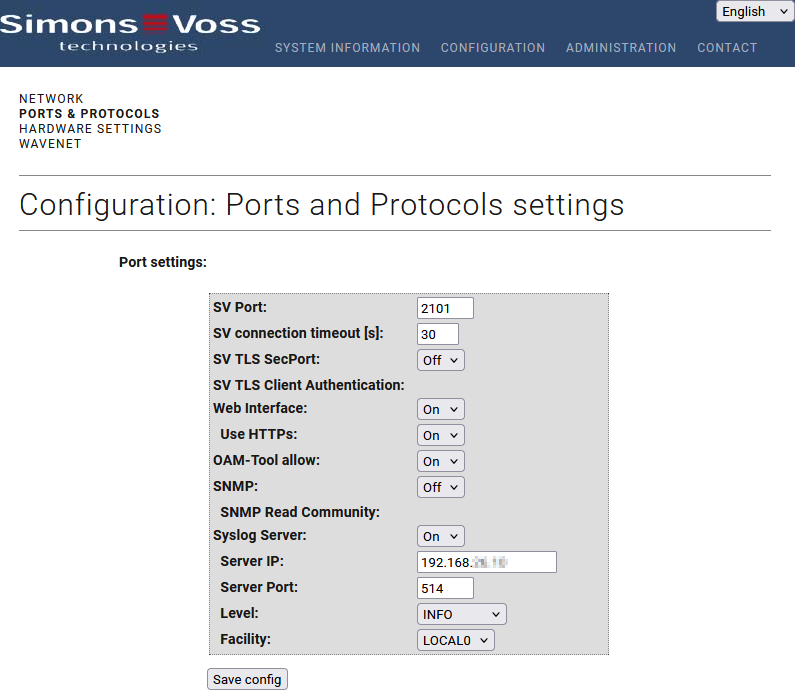
- From the drop-down menu, select item Ein.
- Configure the necessary settings (IP address of the Syslog server, UDP port, desired Level and Facility for sending Syslog messages).
- Click the button Save, to apply the changes.
- RouterNode 3 restarts.
Timestamping of messages is provided by internal RTC of RouterNode 3. For this reason, enter a valid NTP server for time synchronisation to facilitate correct time stamps in messages (see also RTC time synchronisation).
NOTE

Syslog level DEBUG for troubleshooting only
Enabling the DEBUG level in the Syslog may impair the performance and normal operating conditions of RouterNode 3.
- Only enable this Syslog level as part of troubleshooting.