Update firmware - RouterNode 3
The RouterNode 3 firmware can be updated directly via the configuration interface. The firmware images required are provided in encrypted and signed form by SimonsVoss.
The authenticity of the firmware is checked before the update. Only firmware provided by SimonsVoss can be installed on RouterNode 3.
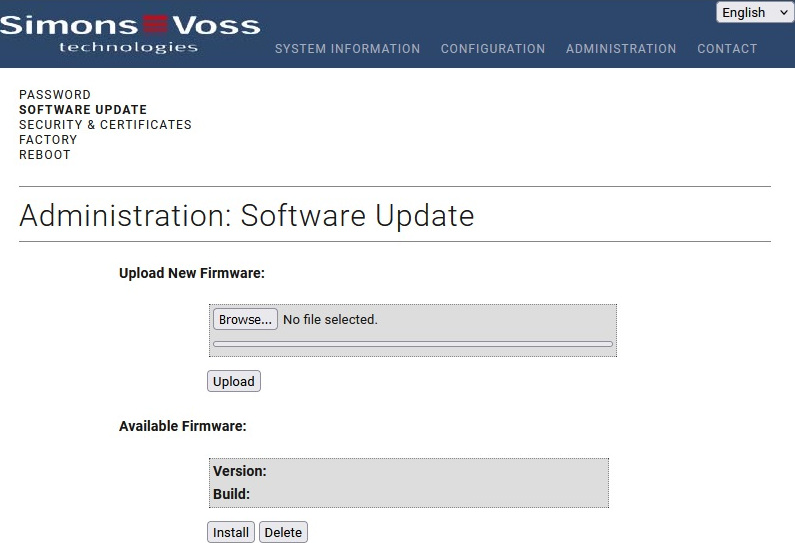
- The configuration interface opens, (see Configuration interface).
- Use ADMINISTRATION to select the input.
- The firmware update page opens.
- Click the button Browse... and select the firmware image (with the “.sve” extension ).
- Click the Hochladen button.
- The firmware image is loaded into the cache of the RouterNode 3 but not yet installed.
- After the upload, the firmware is verified and EventsVerfügbare Firmware is listed in the area after a successful check.
- Click the button EditInstallieren to install the firmware.
- The RouterNode 3 prepares for the firmware installation and restarts.
- After the restart, the firmware update is complete. The process takes about two minutes.
After installation, the new firmware version can be checked in the system information (see Overview).
Your WaveNet administration software (WaveNet Manager, AXM and LSM) regularly checks whether new firmware is available. A message will appear whenever a new firmware release is available.
You can also check and download firmware updates manually. To do this, go to the software download area of the SimonsVoss website ( https://www.simons-voss.com).