Time zone plan - LSM 3.6 SP1 Basic
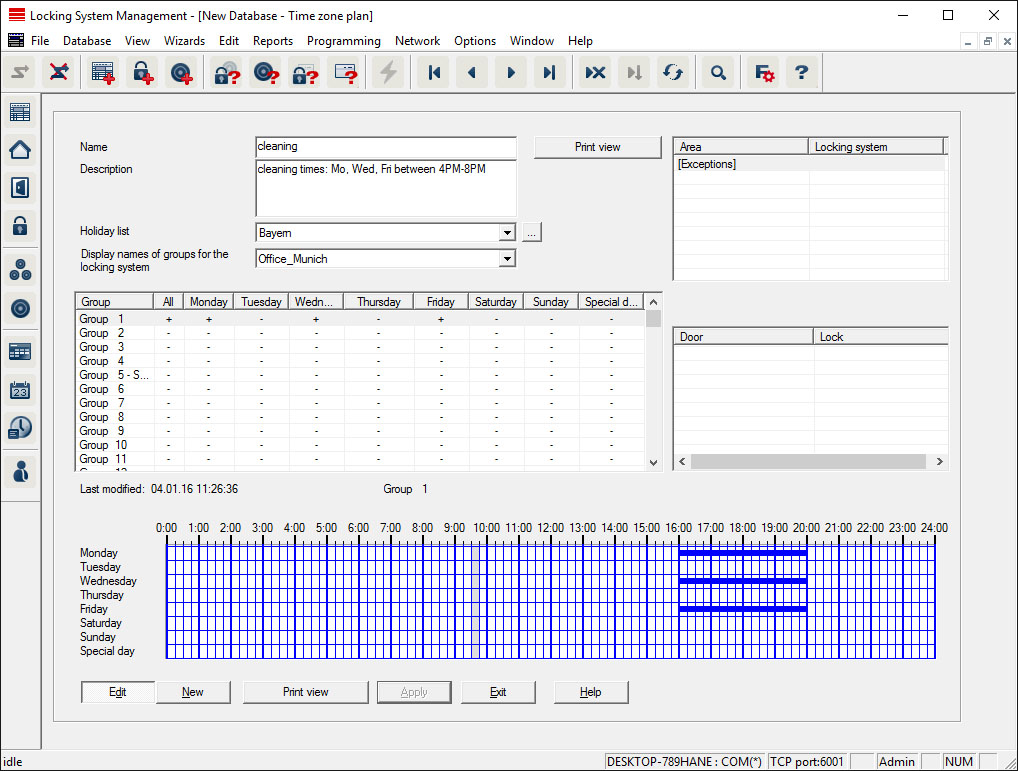
You can create time zone plans in this section.
- Name
- Suitable, unique name for the time zone plan.
- Description
- Apt description of the time zone plan.
- Public holiday list
- Select a relevant geograPHIcal location.
- Display names of groups for the locking system
- Selects the locking system for which the time group names changed manually are displayed.
- Time groups table
- Up to 100 time groups may be defined for each time zone plan. First select a group and then edit the weekly program.
NOTE

The fifth group is intended for time change-over (see Time switch-over function).
- Small tables on right at top
- If the time zone plan has already been assigned to an area, this displayed in the two small tables.
NOTE
Next, always create a time zone plan first and later assign it to an area or an individual locking device. You can do this at Edit/Area, for example.
- Weekly schedule
- Fields filled in blue indicate an authorisation at this time.
- You can click on fields individually or select by holding down the mouse button to make changes.
- Edit
- This button needs to be enabled to edit the time zone plan. Changes can be saved by pressing the "Apply" button.
- New
- The "New" button creates a new, empty time zone plan.