Matrix settings - LSM 3.6 SP1 Basic
Each user has the option of setting up their preferred screen as their default screen. This screen is shown after logging on. Different basic settings can also be enabled here.
You can use the menu bar to adjust settings on the standard view at View/Matrix view properties.
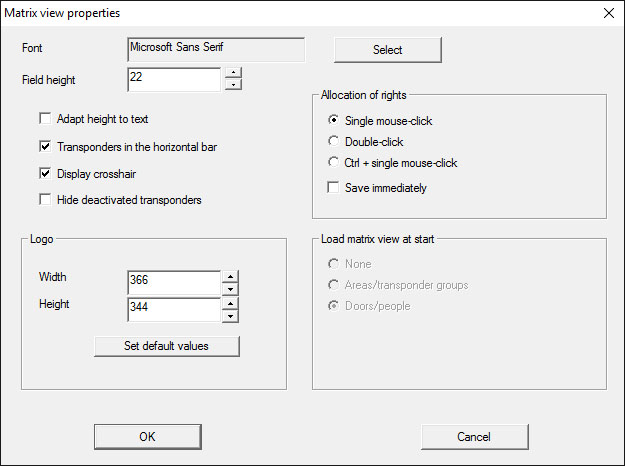
- Font
- You may select any fonts.
- Field height
- You can set the height for fields in points.
- Adjust height to the typeface
- Adjust the height automatically to the typeface.
- Transponders in the horizontal bar
- Transponders are displayed in the horizontal bar by default. You can change this setting if you wish to manage more locking devices than transponders.
- Shows crosshair
- Shows a crosshair for more precise navigation.
- Hide deactivated transponders
- Hides deactivated transponders.
- Logo
- Change the size of the logo.
- Issuing of authorisations
- Mistakes can be quickly made with a mouse click, particularly in the case of large locking systems. In such cases, we recommend changing this setting.
- Activate "Save immediately" if you wish to apply changes to authorisations immediately by simply clicking the mouse.