Configuration - LSM 3.6 SP1 Basic
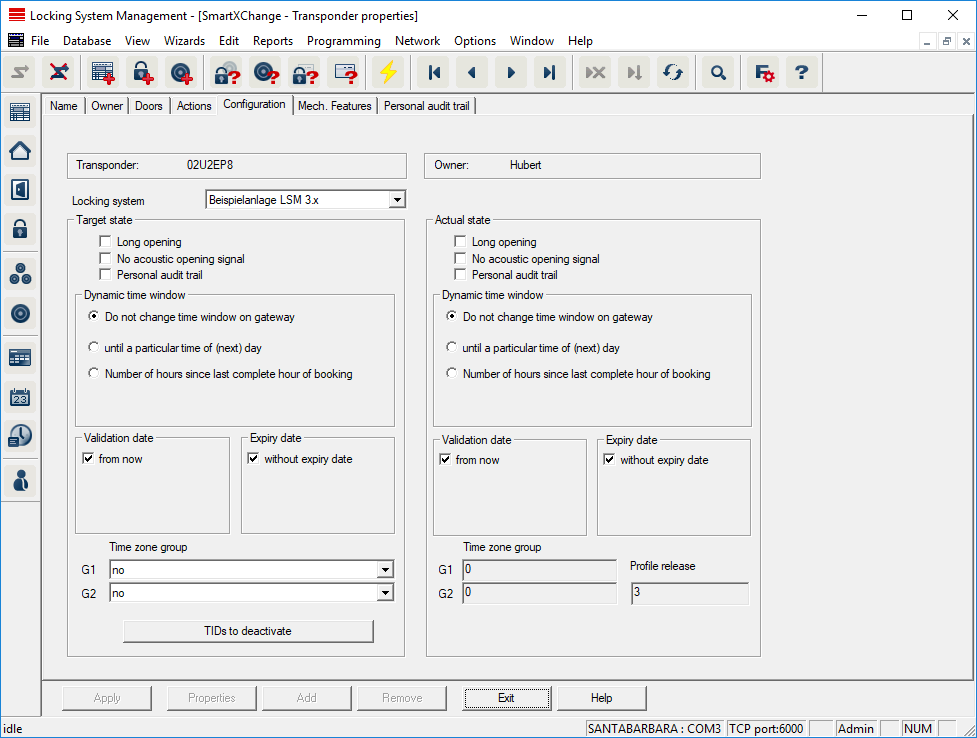
This tab is divided into two sides:
- The left side shows the transponder's target status – i.e. the required status configured in the LSM software.
- The right side shows the transponder's current status, i.e. the status which was last programmed.
- Locking system
- Displays the transponder's currently assigned locking system.
- Long opening
- This allows the locking device to remain engaged to open for longer. The locking device impulse length is doubled. Example: People with disability possibly require the door to be open longer.
- No audible opening signal
- The locking device responds to the transponder without emitting an audible signal. Example of use: assisted living accommodation. The duty nurse can enter the room at night without making a noise.
- Physical access list
- Saves all access events on the transponder.
- Activation date
- Date and time from which the transponder is to be valid.
- Expiry date
- Date and time from which the transponder is to be no longer valid.
- TIDs to deactivate
- You can save to the transponder ID for other transponders which have been deactivated. As soon as the transponder registers on a locking device, the deactivations will come into effect on the locking device in question.