Changing the configuration of a locking device - Step-by-Step SVCN
NOTE

Description of door management with SmartIntego Config Tool
The door management descriptions in this document refer to the SmartIntego Config Tool. Generally, your integrator has its own door management software, the operation of which may differ.
- Read the documentation for the integrator system used.
- Only use this chapter if your integrator absolutely needs the SmartIntego Config tool.
NOTE
Electronics for SI Digital Cylinder AX with reader on both sides
In the version with a reader on both sides, the SI Digital Cylinder AX is equipped with an electronic reader thumb-turn on the outside and an electronic reader thumb-turn on the inside. Both thumb-turns are independent of each other.
- Create and configure the two electronic reader thumb-turns separately.
- Program the two electronic reader thumb-turns separately.
- Integrator system open.
- Select the locking device.
- Change the configuration as desired.
- With button Add task add the action SI_Tool: Task Program [offen].
- Programming task created.
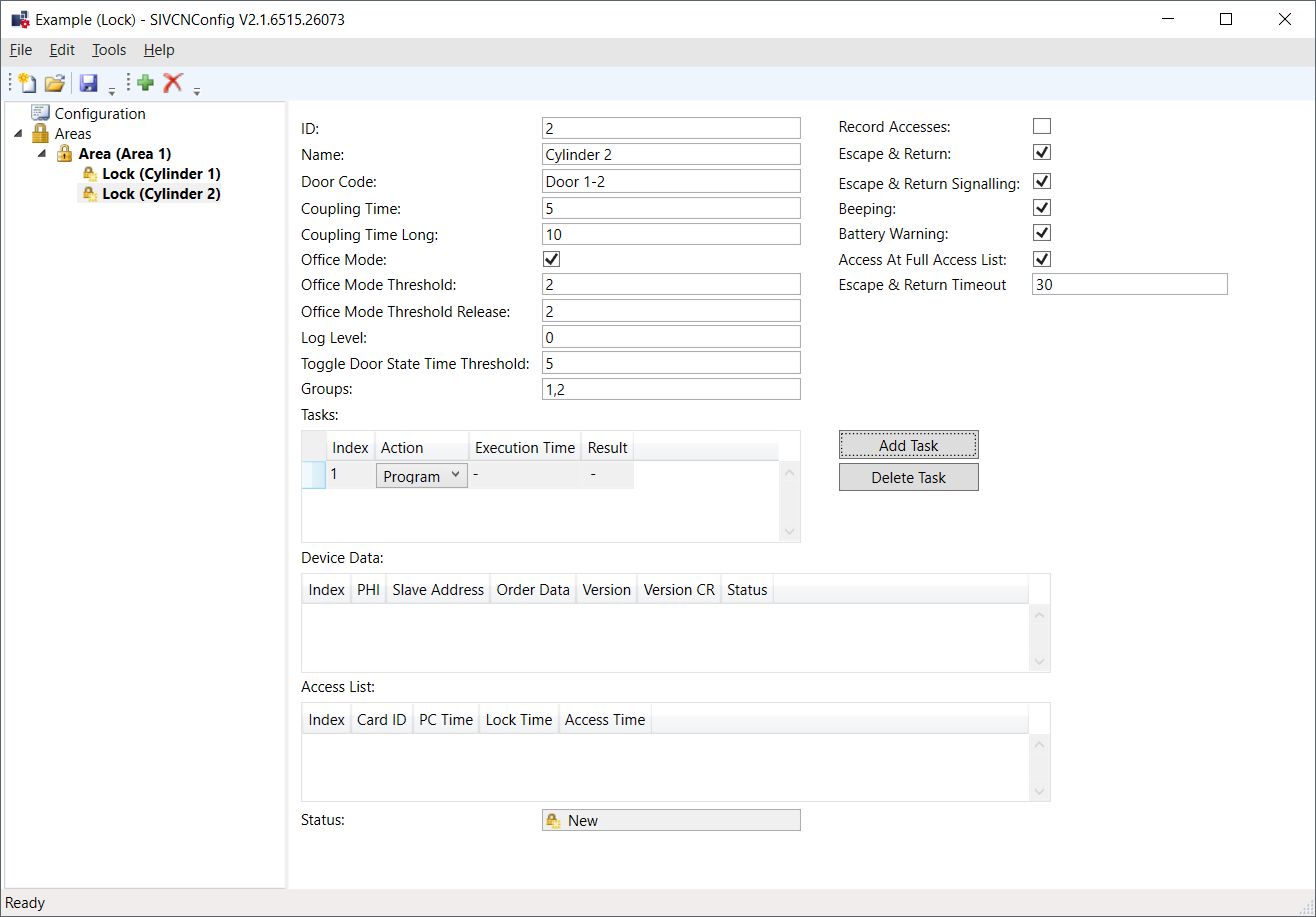
- Save the XML file.
- Programme the locking device (see Programming locking devices).
- Hold a blacklist card (contains all currently valid blacklist entries, comes from the integrator system) in front of the locking device (for locking devices that read on both sides: To both readers).
- Blacklist in locking device updated.
- Configuration changed.