Configuration TCP GatewayNodes - System description WO
The TCP GatewayNodes can be adapted to the respective IT infrastructure (see integrator documentation). For this purpose, the connected GatewayNodes in the network provide a website that can be opened via the IP or DNS name with a browser. The following setting options are available:
SYSTEM INFORMATION | OVERVIEW | Displays the IT settings. |
WAVENET | Displays the WaveNet settings. | |
CONNECTION | Shows the active connection to the integrator system. | |
CONFIGURATION | NETWORK | Changes general network settings. |
PORT | Sets the port for TCP connection. | |
ETHERNET INTERFACE | Sets the speed and IEEE802.1X. | |
WAVENET | Resets WaveNet settings. | |
ADMINISTRATION | PASSWORD | Changes the login password. |
AES | Changes the AES settings (encryption password between GatewayNode and integrator system), binding the GatewayNode to the respective integrator system. Only visible when accessed via HTTPS. | |
CERTIFICATE | Sets TLS encryption between GatewayNode and integrator system. | |
FACTORY | Resets the GatewayNode to the factory settings. | |
REBOOT | Restarts the GatewayNode (Depending on browser settings, this function may also be deactivated). |
Open website
You receive the device with the following factory configuration:
IP address | 192.168.100.100 (if no DHCP server is found) |
Subnet mask | 255.255.0.0 |
User name | SimonsVoss |
Password | SimonsVoss |
In the address bar, type https://IP address (computer and GatewayNode must be on the same network). Then change the password.
Some browsers do not register any spaces included at the start of a password, so do not begin your password with spaces.
- Browser interface opened.
- Open the PASSWORD tab using ADMINISTRATION.
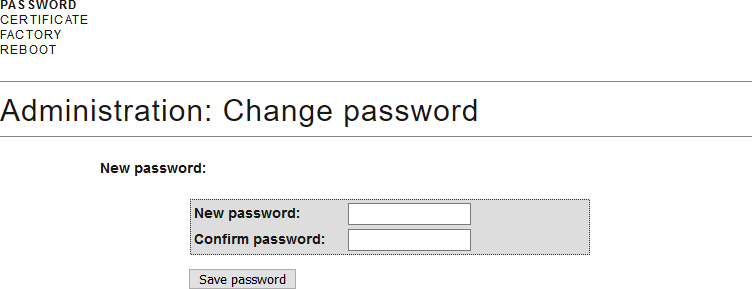
- Enter your new password.
- Repeat your new password.
- Click on the Save password button.
- Password is now changed.
IMPORTANT
Access via default password
Other people can access the product using the factory-set access data.
Some browsers do not transmit spaces at the beginning of the password.
- Change the default password.
- Do not start the password with spaces.
NOTE

Loss of passwords
Your passwords are the basis for managing your locking system. Lost or publicly known passwords are a serious security risk and/or lead to loss of control over the system.
- Make a note of your passwords.
- Store your passwords in a safe place.