Creating new persons with transponders - Smart.XChange
Tab Persons
You use this tab to copy new persons into the LSM database from the source file. A person is unambiguously identified using their personnel number (field Personal Number in the mapping viewer). For display in the matrix of LSM, the surname (field Lastname in the mapping viewer) is also required. These details are therefore mandatory(*).
Assignment view: Settings
selection | Incorporated into the LSM database as |
|---|---|
no | Not incorporated (column is ignored) |
Activation date | Activation date of the transponder |
Expiration date | Expiration date of the transponder |
Time frame mode | Timeframe mode (defines the dynamic timeframe mode in the tab Configuration of the transponder) 0 = Do not change time window on gateway |
Time frame value | Time frame value (dependent on Time frame mode)
|
Cost Account | Cost centre |
G1 Time Group ID | G1 time zone group to which the transponder is assigned |
G2 Time Group ID | G2 time zone group to which the transponder is assigned |
*Personal Number | Personnel number |
Firstname | First name |
*Lastname | Last name |
Job place | Location/building |
Job title | TITLE |
Phone | Phone number |
Startdate | Joining date |
End date | Leaving date |
Address | Address |
Birth date | Date of Birth |
Department | Department |
Description | Note |
Transponder type | Indication of the transponder type 0 = Undefined transponder type |
Transponder group | Transponder group to which the transponder is assigned. |
Locking system name | Name of the locking system to which the transponder, the person or both are assigned. |
Note on G1 Time Group ID/G2 Time Group ID and Transponder group
The mapping value G1 Time Group ID or G2 Time Group ID can only be assigned to one of the two database values:
- TransponderGroup.TimeGroupID or TransponderGroup.TimeGroupG2ID
- Transponder.TimeGroupG1ID or Transponder.TimeGroupG2ID
In LSM, you can assign a group of transponders (TransponderGroup) to a time zone group (TimeGroup) in order to assign time-controlled authorisations for several persons simultaneously (=TransponderGroup.TimeGroup). You can recognise transponders with group-controlled time budgets in the LSM: In the tab Configuration in the area Time zone group in the dropdown menu or there is an addition in the brackets of the time zone group. This addition specifies which transponder group with time zone group determines the time zone group of this transponder. Assign the mapping value G1 Time Group ID or G2 Time Group ID to the database value Transponder.TimeGroupG1ID or Transponder.TimeGroupG2ID.
If you want to assign different time authorisations to individual transponders from a transponder group with time zone group, you can also assign a time zone group directly to these transponders (=Transponder.TimeGroup). This overwrites the time authorisation that results from the transponder belonging to a transponder group with time zone group (TransponderGroup.TimeGroup) (Transponder.TimeGroup > TransponderGroup.TimeGroup). Assign the mapping value G1 Time Group ID or G2 Time Group ID to the database value TransponderGroup.TimeGroupID or TransponderGroup.TimeGroupG2ID.
Task options
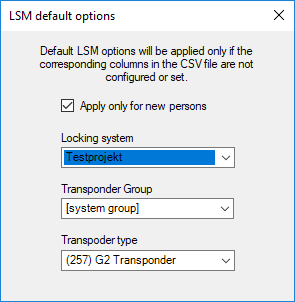
setting | Position |
|---|---|
Locking system | If the field is empty in the source file or no suitable selection has been made, the value selected here is used. |
Transponder group | If the field is empty in the source file or no suitable selection has been made, the value selected here is used. |
Transponder type | If the field is empty in the source file or no suitable selection has been made, the value selected here is used. |
Apply only for new persons | Entries which already existed when the last import was made are ignored. |
Remarks
- If a transponder type is indicated, but no transponder, a transponder is added and assigned to the person.
- A person may already have another type of transponder assigned which has not yet been programmed. In this case, this transponder's type will be replaced by the indicated type.
- If a transponder type is indicated, but the person has already been assigned a programmed transponder, this specification will not take effect.
- If a transponder group is indicated, then the locking system name needs to be specified.
- If no transponder group is indicated, but there is a name for the locking system, then the transponder group is the same as for the system group for the locking system.
- If a transponder group is indicated, then the transponder is assigned to this group. Except: The transponder is already assigned to a transponder group in the locking system.
- If a transponder group is already indicated, then the transponder is moved to this group if it is already assigned to a transponder group.