Deactivate transponder/delete person - Smart.XChange
Persons tab
You use this function to remove persons and remove/deactivate/detach transponders which are named in the source file. A person is unambiguously identified with their personnel number (Personal Number), so that the selected actions can be used for the person concerned. This information is therefore mandatory(*).
CAUTION

Data loss
Incorrect personnel numbers in the source file mean actions are inadvertently applied to other people.
- Ensure the personnel numbers are correct in the source file.
Mapping viewer: Settings
selection | Incorporated into the LSM database as |
|---|---|
no | Not incorporated (column is ignored) |
*Personal Number | Personnel number for the person who is to be removed from the data record. |
Task options
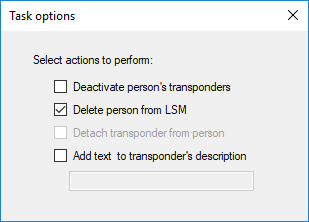
setting | Position |
|---|---|
Detach | Transponder is no longer assigned to the person (however, the person remains in the LSM database and is not reimported). |
Deactivate | Transponder is deactivated. |
Delete | Person is removed from the LSM database; transponder remains in the LSM database. |
Add text to transponder's description | Adds the entered text to the transponder description. |