Add new doors with locking device - Smart.XChange
Doors register
You use this function to copy new doors from the source file to the LSM database. A door can be unambiguously identified (Door code). The door designation is also required to display the door in the matrix in LSM (Door name). These details are therefore mandatory(*).
Assignment view: Settings
selection | Incorporated into the LSM database as |
|---|---|
no | Not incorporated (column is ignored) |
Area name | Area |
Building shortcut | Building |
Description | Description |
*Door code | door code |
*Door name | Door identifier |
Floor | Floor |
Location shortcut | Location |
Lock type | Type |
Locking system name | Locking system |
Room number | Room Number |
Task options
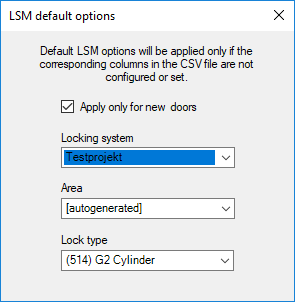
setting | Position |
|---|---|
Locking system | If the field is empty in the source file or no suitable selection has been made, the value selected here is used. |
Area | If the field is empty in the source file or no suitable selection has been made, the value selected here is used. |
Lock type | If the field is empty in the source file or no suitable selection has been made, the value selected here is used. |
Apply only for new doors | Entries which already existed when the last import was made are ignored. |