Issue user PIN - PIN code terminal
The User PIN is generated by LSM. The user cannot select or change the User PIN himself. Instead, output the User PINs as a message and only make the User PIN available to each user.
- LSM open.
- PIN code terminal programmed (see Programming the PIN code terminal).
- Locking device (see Programme locking device).
- Open the properties of your locking system using Edit - .
- Change to the PIN-Code Terminal tab.
- In the section PIN code user select all users whose User PINs you want to output in the message.
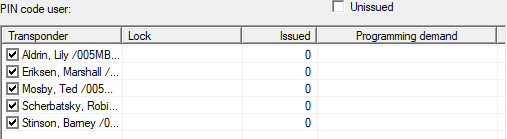
- Click on the PINs button.
- Message with User PINs is displayed.

- Only inform each user of their own User PIN.
- Users can use the PIN code terminal with their User PINs.