Preparing locking devices in LSM - PIN code terminal
The PIN code terminal is assigned to a SimonsVoss locking device and can only open this device for security reasons. To do so, you must configure the locking device for use with a PIN code terminal:
- LSM open.
- Locking device to be assigned has already been created.
- Select your locking device to be assigned.
- Open the properties of your locking device using Edit - (alternative: Double click).
- Change to the "Door" tab.
- Activate the checkbox in Door attributes for cylinder the area
 PIN-Code Terminal.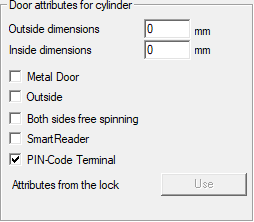
- Click on the Apply button.
- PIN code terminal can be assigned to this locking device.