Creating users - PIN code terminal
Create all users and authorise users to the locking device before programming.
- Create a transponder group to simplify handling.
- Create all users as members of this transponder group.
- Create users even if you don't need them yet. This "stock" saves you programming later. Instead, the authorised users stored in the reserve are simply activated with the initial PIN (see Unlock user with initial PIN).
Creating a transponder group
- LSM open.
- Right-click on .
- The context menu opens.
- Select "Update" in the context menu .
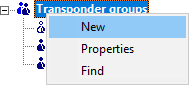
- The window for creating a transponder group opens.
- Create a transponder group with a suitable name, e.g. PIN code terminal user.
Creating users in the transponder group
- Open the form for new users with the button
 .
. - Select the transponder group you have created.
- From the drop-down menu , select G2 PIN code user.
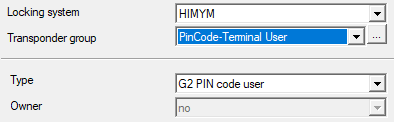
- Fill in the rest of the form. Leave free fields when you create users on stock.
- User created in LSM.
- Authorise the entire transponder group for the locking device.
- Continue with the programming (see Programming the PIN code terminal).