Add new doors with locking device - Smart.XChange
Doors tab
You use this function to copy new doors from the source file to the LSM database. A door can be unambiguously identified (Door code). The door designation is also required to display the door in the matrix in LSM (Door name). These details are therefore mandatory(*).
Assignment view: Settings
selection | Incorporated into the LSM database as |
|---|---|
no | Not incorporated (column is ignored) |
Area name | Size |
Description | Description |
Floor | Floor |
Building shortcut | Building |
Room number | Room Number |
Locking system name | Locking system in which the locking device is created |
Lock type | Locking device type: |
Location shortcut | Location |
*Door name | Door identifier |
*Door code | door code |
Task options
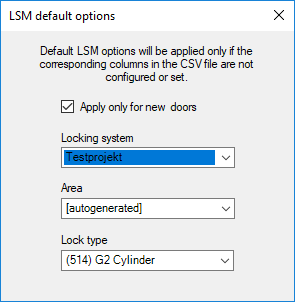
Setting | Function |
|---|---|
Locking system | If no column has been selected for Locking system name in the mapping or no locking system has been specified for an entry, the entry is created in the locking system selected here. |
Area | If no column was selected for Area in the mapping or no area is specified for an entry, the entry is assigned to the area selected here. |
Lock type | If no column has been selected for Lock type in the mapping or no locking device type has been specified for an entry, the entry is created as the locking device type selected here. |
Apply only for new doors | Entries which already existed when the last import was made are ignored. |