Displays - MobileKey Locking cylinder (Z4) DoorMonitoring
You can display the key information about your locking system directly in the locking plan. The DM Cylinder's door statuses can be shown directly on the locking plan
- This view is only useful if the DM Cylinder is connected online
- If a wireless node (LockNode) fails, the system does not detect the fault until the cylinder is addressed by the LSM (reading, reprogramming). That is why it is sensible to check the status of the WaveNet network
- The cylinders transmit all status changes to LSM (LSM Basic Online) or the CommNode server (Business / Professional) in real time. If LSM is closed, the status displayed at that moment is saved
- If a door status changes while LSM is closed (Basic) or the CommNode server has been paused (Business / Professional), the system does not record this change. The correct status is not displayed until a change has been made to the status at the door
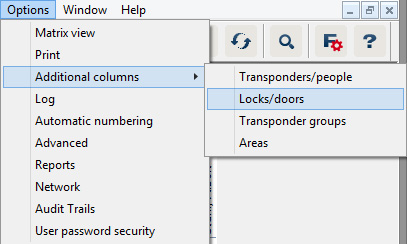
- Click on 'Options' > 'Additional columns' > 'Locking devices/doors' in the menu row
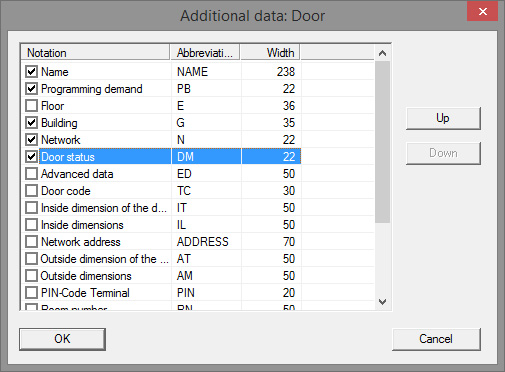
- Select 'Network' and 'Door status'
- Click on [Up] and [Down] to change the order of the list
- The network connection and door status are now displayed in the locking plan
Matrix view
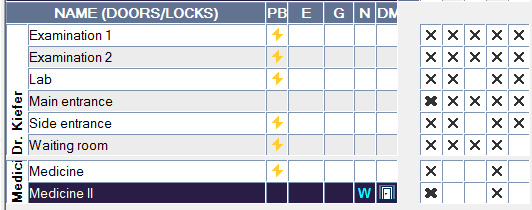
The door statuses are displayed using different icons in the matrix
Icon | Status | Information |
|---|---|---|
| Door securely locked | Door is locked and cam has been rotated to [securely locked] position |
| Locked | Door is locked and cam has not been rotated as far as the [securely locked] position |
| Closed | Door is closed and bolt retracted |
| Open | Door open |
| Error message - undefined status / warning / alarm | This icon has different meanings: Door open too long Fastening screw has been manipulated (no longer addresses, has been removed) Magnetic field manipulation (magnetic field on the fastening screw is too extensive) Door has been forced open (door is opened despite locking) |
| Status unknown | Undefined status – the status is unknown due to a malfunction or a non-logical change to the system |


Unknown status
The 'Unknown status' icon and the alarm icon do not change automatically if the reason for the malfunction disappears (an exception is the 'Door open too long alarm' which does not disappear when the door is closed). The alarm must be reset
Error message | Action |
|---|---|
Undefined door status | Door must be opened, then closed again. Cylinder detects the status and transmits it to LSM |
Door open too long | Close door |
Fastening screw has been manipulated (has been removed) | Check fastening screw. Reset the error once it has been eliminated; see section on Cylinder |
Magnetic field manipulation (fastening screw magnetic field too extensive) | Check door. Reset error; see section on Cylinder |
Door has been forced open (door is opened despite locking) | Check door. Reset error |